Your hand hurts. Or your wrist. Or your forearm. Maybe it’s been building for months — a dull ache that shows up around mid-afternoon and fades by evening, only to come back a little sooner the next day.
You’ve looked into ergonomic mice. You’ve seen the vertical mouse ads. You’ve watched someone using a trackball and wondered if that’s the answer. You’ve read articles comparing them, but they all seem to assume you’ve already decided which category you want and just need help picking a model within it.
This guide starts one step earlier. It starts with where you actually hurt — because the right ergonomic mouse depends more on your specific symptom pattern than on any product review. Forearm fatigue from pronation needs a different solution than finger tendon pain from constant clicking, which needs a different solution than shoulder tension from reaching. Buying the wrong category doesn’t just waste money — it can fail to help or occasionally make things worse.
Here’s how to match your situation to the right type, what the ergonomic mouse benefits actually are for each, and what to expect when you switch.
Key Takeaways
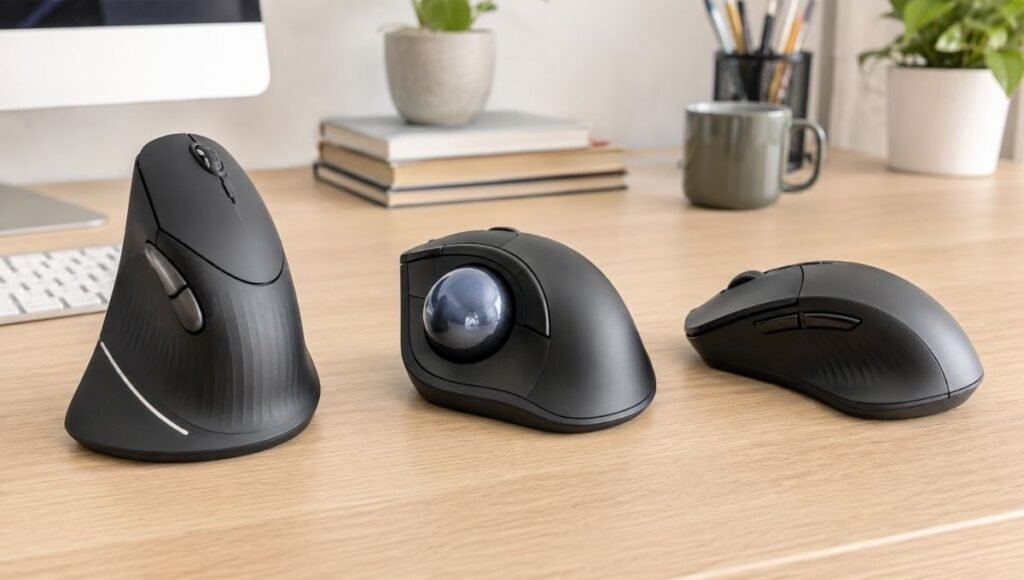
- There are three distinct ergonomic mouse categories, each addressing different biomechanical problems: vertical mice reduce forearm pronation, trackball mice eliminate arm movement entirely, and contoured standard mice improve grip comfort without changing fundamentals
- The right choice depends on where your discomfort is: forearm and wrist ache → vertical mouse; shoulder and arm fatigue from sweeping movements → trackball; general hand fatigue without specific joint pain → contoured standard ergonomic mouse
- A systematic review of 17 controlled trials found that ergonomic mice reduce musculoskeletal discomfort in the forearm and wrist compared to standard flat mice — but the evidence varies by type and user
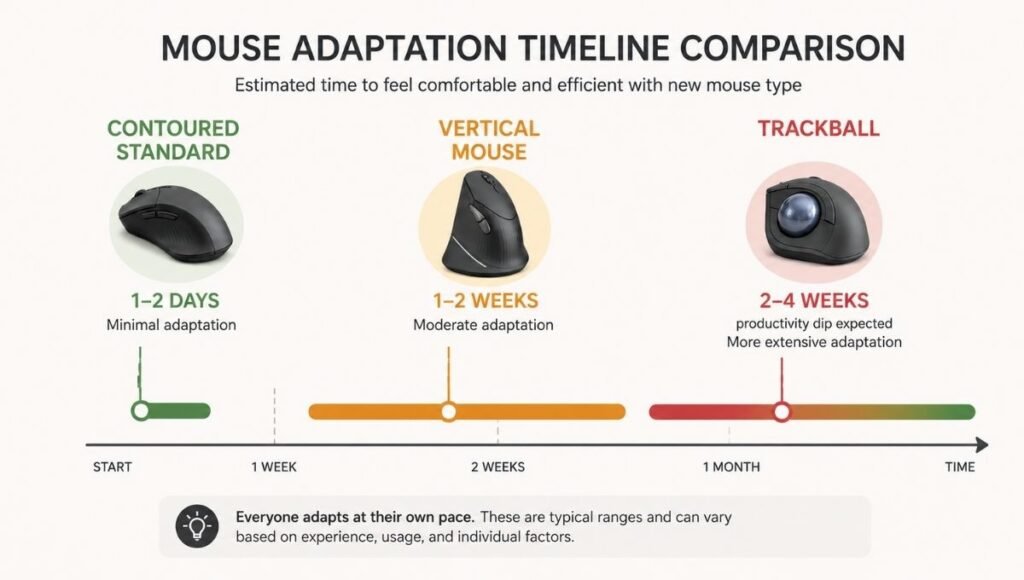
- Adaptation time differs significantly: vertical mice typically take 1–2 weeks to feel natural; trackball mice require 2–4 weeks and a genuine productivity dip before the benefits emerge
- None of these changes replace correct desk height, mouse positioning relative to the keyboard, or adequate movement breaks — ergonomic accessories work best as part of a complete setup
The Problem with Standard Mice (And Why It Matters for Your Specific Pain)
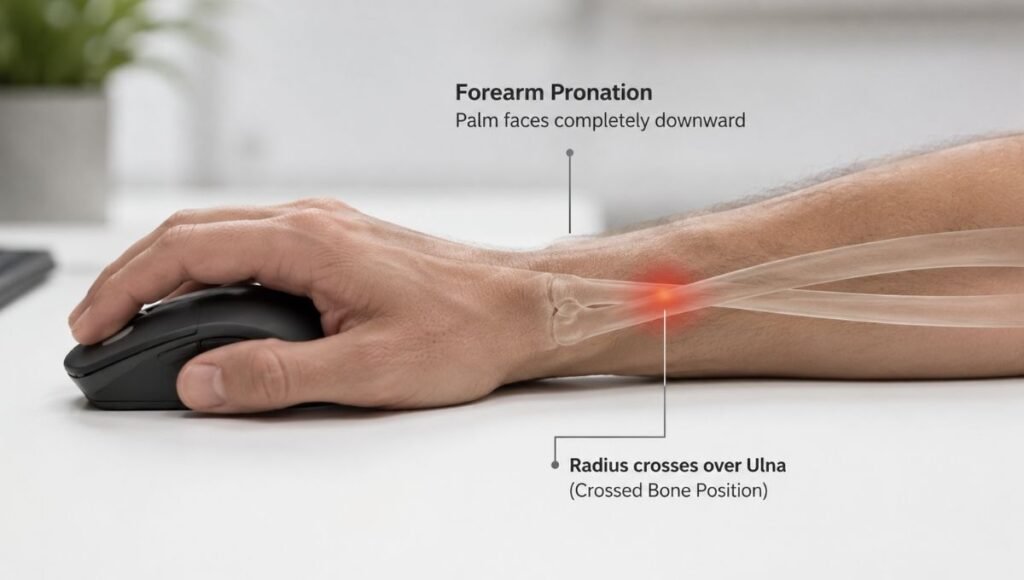
A standard flat mouse forces your forearm into full pronation — palm facing down, radius and ulna bones crossed. Hold your arm in front of you, palm up (like you’re carrying a tray). Now flip it palm down. Notice what happens in your forearm: the muscles engage and the bones cross. Hold that position for six hours. That’s roughly what a standard flat mouse asks of your forearm every working day.
But pronation is only one of several biomechanical issues with standard mouse use. There’s also:
Repetitive wrist deviation — the side-to-side wrist movement when moving a mouse across a pad. For people who do large sweeping mouse movements (designers, architects, spreadsheet users navigating large ranges), this adds up to significant accumulated movement over a day.
Finger tendon loading — every click loads the tendons running through the carpal tunnel. Light switches are fine; repeated clicking with moderate force over hours creates cumulative tendon strain.
Reach and shoulder elevation — if your mouse is positioned too far to the right of your keyboard, you’re reaching with a slightly elevated arm all day. This creates shoulder and neck tension that isn’t a mouse problem per se, but is commonly attributed to one.
Understanding which of these is your primary issue changes which solution makes sense.
Ergonomic Mouse Type 1: The Vertical Mouse
What it does
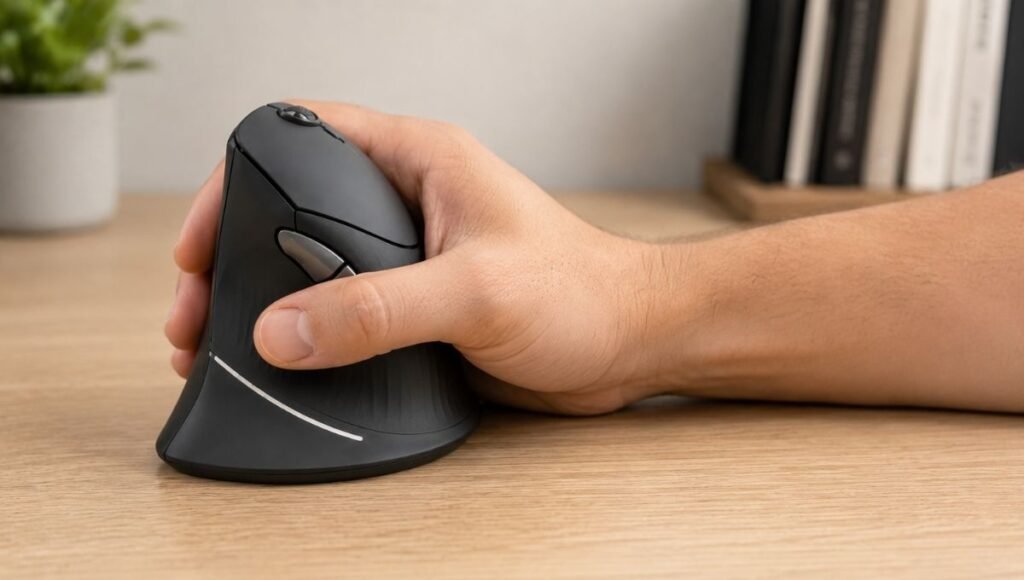
A vertical mouse rotates the grip approximately 90 degrees into a handshake position — thumb up, palm facing inward. In this position, the radius and ulna bones sit parallel rather than crossed, reducing the forearm muscle activation required to sustain the grip.
Research measuring electromyography during mouse use shows that vertical mice reduce forearm extensor muscle activity by 14–23% compared to standard mice. For people whose primary complaint is forearm ache and wrist fatigue from sustained pronation, this reduction is meaningful.
Who it’s right for
Forearm and wrist fatigue that builds through the day and fades with rest. This is the classic pattern of accumulated pronation fatigue — the muscles tire from sustained contraction, and rest allows them to recover. A vertical mouse reduces that sustained contraction.
General knowledge workers — people whose work involves navigating applications, browsing, email, and document editing. The vertical grip doesn’t compromise the arm-and-wrist movement patterns these tasks require.
Who should be cautious
The vertical mouse doesn’t eliminate wrist movement — it rotates it. If your pain is from wrist joint instability or specific wrist conditions (not general fatigue), the vertical orientation may create different but comparable stress.
People with limited desk space: vertical mice are typically taller than standard mice and require similar mousing area. They don’t help with the desk space constraint.
Adaptation timeline
Most people feel moderately comfortable within one week and fully natural within two. The adjustment is primarily motor memory for click positions and scroll wheel location. Speed and precision recover faster than with a trackball.
Starting recommendation
The Anker Ergonomic Vertical Mouse (~$30) for first-time users testing the category. The Logitech MX Vertical (~$95) for people who’ve confirmed vertical works for them and want wireless, better build quality, and full-day battery life.
→ For detailed vertical mouse research and specific recommendations: Vertical Mouse: Does It Actually Work? What Research and Users Say
Ergonomic Mouse Type 2: The Trackball Mouse
What it does
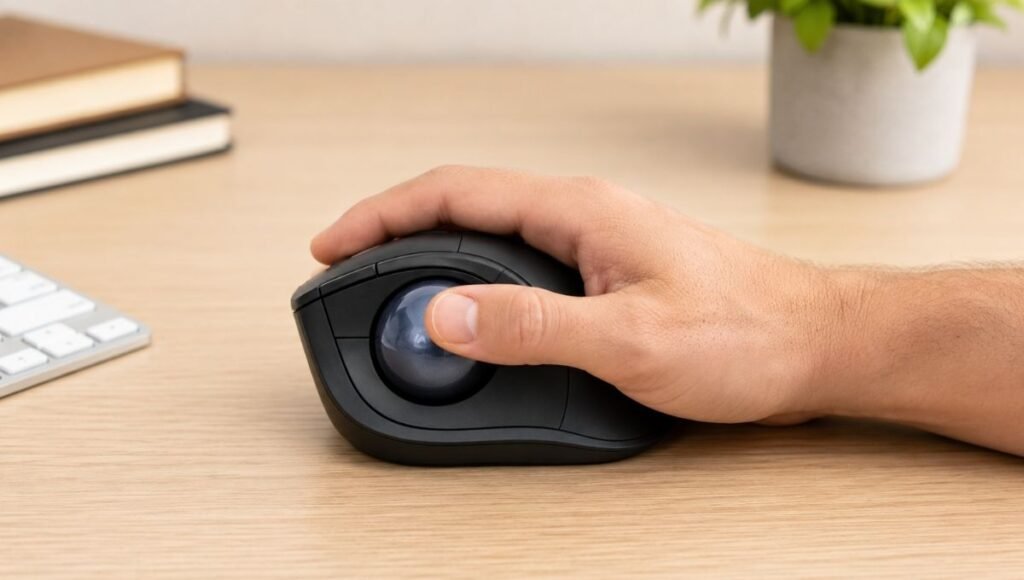
A trackball mouse eliminates arm and wrist movement entirely. The device stays stationary on your desk; you control the cursor by rotating a ball with your thumb (thumb trackball) or fingers (finger trackball). Your arm, wrist, and hand position remain fixed. Only your thumb or finger digits move.
This is a fundamentally different ergonomic approach from the vertical mouse. It doesn’t change your grip posture — it eliminates the movement patterns that cause strain from repetitive mousing.
Who it’s right for
Shoulder and upper arm fatigue from large sweeping mouse movements. If you move your mouse across a full mouse pad frequently throughout the day and feel it in your shoulder by afternoon, a trackball eliminates those arm movements entirely.
People with limited desk space. A trackball sits in one spot and never moves. No mouse pad required. For crowded desks or setups where mouse range is constrained, this is a significant practical advantage.
Conditions where any wrist movement causes pain. As GearLab’s testing found: “If you have a condition that demands no wrist movement whatsoever, a trackball mouse is a better option than a vertical mouse.” The stationary design allows people to position their arm once and leave it there.
Who should be cautious
People who need precision for design, photo editing, or other fine cursor work: the learning curve for fine control with a trackball is steep and real. Some users never achieve the precision they had with a standard or vertical mouse. Test with a budget model before committing to this category.
People whose primary complaint is finger or thumb fatigue: thumb trackballs move the cursor control burden to the thumb, which may transfer strain rather than eliminate it. Finger trackballs distribute the load across multiple digits, which is better for this pattern.
Adaptation timeline
This is the category with the most demanding learning curve. Expect 2–4 weeks of reduced productivity — cursor control feels imprecise, fine movements take conscious effort, and the click layout is unfamiliar. The week-two frustration is real and frequently causes people to give up too early. Most users who push through to week four report that going back to a standard mouse feels strange.
Starting recommendation
The Logitech M575S (~$35–45) for first-time trackball users — it’s the most commonly recommended entry-level thumb trackball because it’s inexpensive enough to test the category without significant risk. The Logitech MX Ergo S (~$100) for committed trackball users who want adjustable tilt angle and premium build quality.
Ergonomic Mouse Type 3: Contoured Standard Ergonomic Mouse
What it does
This category — often overlooked in ergonomic mouse comparisons — keeps the familiar flat orientation of a standard mouse but significantly improves the shape to support a more natural hand position. A well-designed contoured mouse has a pronounced palm support hump, sculpted finger rests, and sometimes a slight inward tilt that partially reduces pronation without the full 90-degree rotation of a vertical mouse.
For many people, this is the right starting point.
Who it’s right for
General hand fatigue and discomfort without specific wrist or forearm joint pain. If your mouse use causes your hand to feel tired and slightly uncomfortable but you don’t have the specific aching pattern of pronation fatigue or the shoulder involvement of excessive sweeping movement, a better-shaped mouse in the familiar orientation often solves the problem.
People who switch between tasks requiring precision and tasks requiring comfort. Contoured standard mice maintain the precision handling of traditional mice while providing meaningfully better support. Designers and editors who need accuracy fall here.
People who tried a vertical mouse and found the grip genuinely uncomfortable. Not everyone adapts well to the vertical orientation — hand size, specific grip style, and individual anatomy affect comfort. If you tried vertical and didn’t adapt, contoured standard is the next option.
Adaptation timeline
Minimal. The hand position is familiar; only the shape is improved. Most users feel comfortable within a day or two.
Starting recommendation
The Logitech MX Master 3S (~$85–100) is the most widely recommended mouse in this category — well-reviewed for all-day comfort, excellent scroll wheel design, multi-device support, and very good build quality. It’s not as aggressively ergonomic as a vertical mouse but is substantially better than a standard flat mouse for sustained use.
How to Choose: Match Your Symptoms to the Right Category
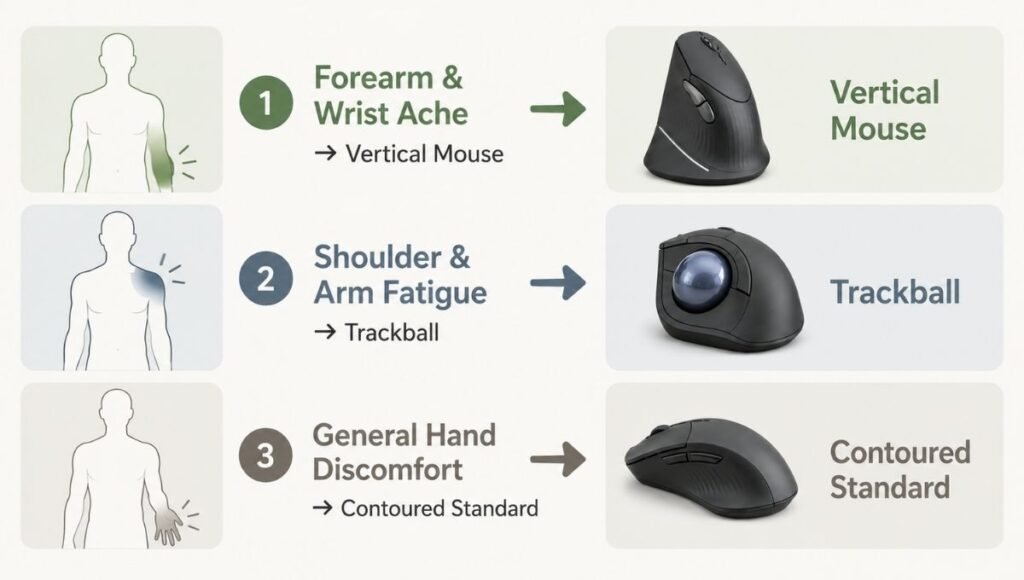
Forearm aches by early afternoon, eases with rest → Vertical mouse The fatigue pattern matches pronation accumulation. The vertical grip addresses the root cause directly.
Shoulder tension or upper arm fatigue, especially if you sweep the mouse widely → Trackball The sweeping arm movement is the problem. Eliminating it eliminates the cause.
Finger or thumb fatigue, frequent clicking work → Contoured standard ergonomic mouse + examine click force habits Mouse type is less relevant here; reducing click force and click frequency matters more. A well-shaped mouse reduces hand fatigue without changing the click mechanics significantly.
General hand discomfort without a clear location → Start with contoured standard It’s the lowest adaptation barrier. If it doesn’t solve the problem after a few weeks, move to vertical next.
Diagnosed carpal tunnel or active RSI → Consult a physiotherapist before choosing The research on which mouse type helps active conditions is less clear than for prevention. A professional can assess your specific situation.
The Ergonomic Mouse Benefits That Apply Across All Types
Regardless of which category fits your situation, a few benefits apply broadly to all ergonomic mouse designs compared to standard flat mice:
Reduced grip tension. Standard mice often require sustained grip force to maintain control. Ergonomic designs — particularly contoured ones — reduce this through better hand support.
Lower click force requirements. Most ergonomic mice use lighter-actuation switches than budget standard mice. Over hours of clicking, this makes a measurable difference to finger tendon load.
Better scroll wheel design. Premium ergonomic mice (MX Master series, MX Ergo S) have significantly better scroll wheels than most standard mice — smoother, better positioned, with useful horizontal scrolling for large spreadsheets.
Wireless freedom. The ergonomic mouse category overlaps heavily with wireless options, which removes the cable tension that sometimes subtly affects hand positioning.
If You Only Have 10 Minutes Right Now
Identify where your discomfort is most prominent during or after mouse use:
Forearm and wrist → try the Anker vertical mouse (~$30). Give it two weeks. Shoulder and upper arm → try the Logitech M575S trackball (~$40). Budget entry point for the category. General hand fatigue → try the Logitech MX Master 3S (~$90). Minimal adaptation, significant comfort improvement.
Start with the least expensive option in the right category. The goal is to test whether the category change helps — not to buy the most premium version before you know it works for you.
When to See a Professional
Ergonomic mice address discomfort from suboptimal mechanics. They don’t treat established injuries.
See a physiotherapist or occupational therapist if: your discomfort is present even when you’re not using a computer; you experience tingling, numbness, or weakness in your hand or fingers; symptoms have persisted for more than a few weeks despite accessory changes; or you’ve been diagnosed with carpal tunnel syndrome, tendinitis, or another specific condition.
These conditions respond well to early professional intervention. The right mouse makes working more comfortable — it doesn’t substitute for medical assessment when one is needed.
FAQs
What are the ergonomic mouse benefits compared to a standard mouse? Ergonomic mice reduce musculoskeletal strain through improved grip posture (vertical), eliminated arm movement (trackball), or better hand support (contoured). A systematic review of 17 controlled trials found they reduce forearm and wrist discomfort compared to standard flat mice. The specific benefit depends on which type you use and which biomechanical problem it addresses.
Is a vertical mouse or trackball better for wrist pain? Depends on where the pain is. Vertical mice address forearm pronation fatigue — the ache from sustained twisted forearm position. Trackball mice address shoulder and arm strain from repetitive sweeping movements. If your wrist pain comes from sustained pronation, vertical is more directly relevant. If it comes from repetitive movement patterns, trackball is more appropriate.
How long does it take to get used to an ergonomic mouse? Contoured standard ergonomic mice: 1–2 days. Vertical mice: 1–2 weeks. Trackball mice: 2–4 weeks with a genuine productivity dip during adaptation. The trackball learning curve is the steepest by far — but most people who push through it report that the benefits are worth it.
Can an ergonomic mouse prevent carpal tunnel syndrome? It can reduce some of the biomechanical risk factors — particularly forearm pronation and repetitive wrist movement — that contribute to carpal tunnel development. It’s not a guarantee, and other factors (genetics, overall activity level, desk setup) also matter. Reducing pronation and repetitive movement during the hours you use a mouse is a meaningful preventive measure.
Should I try a vertical mouse or trackball first? Vertical mouse first, in almost all cases. Lower adaptation barrier, lower cost to test, and more directly applicable to the most common pattern of mouse-related discomfort. If vertical doesn’t solve the problem after a genuine two-week trial, trackball is the next category to test.
Choose the Category, Then Choose the Model
Most ergonomic mouse guides start with product comparisons. The more useful starting point is biomechanics: what movement pattern is causing your discomfort, and which mouse type addresses that pattern.
Vertical mice address forearm pronation. Trackballs address repetitive arm movement. Contoured standard mice address general grip support. Match the category to your symptom, start with the budget entry point, give it a genuine trial period, and upgrade within the category if the approach works.
The right ergonomic mouse won’t fix a poorly positioned desk or a chair at the wrong height. But in a well-configured setup, it can meaningfully change how your arm and hand feel at the end of a working day.
Related Articles on CircuitSeek
- Vertical Mouse: Does It Actually Work? What Research and Users Say →
- Best Ergonomic Keyboard for Home Office →
- Keyboard Wrist Rest: Do You Need One and Are You Using It Right →
- Eye Strain Relief for Remote Workers →
References
- Antwi-Afari, M.F., et al. (2018). Benefits of alternative computer mouse designs: A systematic review of controlled trials. Cogent Engineering, 5(1). https://www.tandfonline.com/doi/full/10.1080/23311916.2018.1521503
- Quemelo, P.R.V., & Vieira, E.R. (2013). Biomechanics and performance when using a standard and a vertical computer mouse. Ergonomics, 56(8), 1213–1221. https://pubmed.ncbi.nlm.nih.gov/23777482/
- NIOSH/CDC. Musculoskeletal Health Program — Computer Workstations. https://www.cdc.gov/niosh/topics/ergonomics/
- TechGearLab. The Best Ergonomic Mouse, Lab Tested and Ranked. https://www.techgearlab.com/topics/small-and-home-office/best-ergonomic-mouse