It usually starts with a comment from a doctor, a physio, or a colleague who swears by theirs.
“Have you tried a vertical mouse?” And suddenly you’re down a rabbit hole of handshake-position grips, ergonomic white papers, and Reddit threads where half the people say it changed their life and the other half say they returned it after three days because their hand cramped up holding it.
If your wrist has been bothering you — that dull ache that shows up by early afternoon, the stiffness when you flex your hand after hours of clicking — you’re probably already considering one. And the fact that you found this article instead of just buying the first one that comes up on Amazon suggests you’re doing this the right way: trying to understand whether it’ll actually help before spending the money.
Here’s the honest picture, including the parts the product pages leave out.
Key Takeaways
- A peer-reviewed study published in ergonomics research found that vertical mouse use reduced forearm pronation by 14° and wrist extensor muscle activity by 14–23% compared to a standard mouse — measurable improvements in the biomechanical risk factors for repetitive strain
- However, a separate clinical review found that vertical mice can cause compensatory wrist extension (bending back), which may partially offset the pronation benefits — the research is real but nuanced
- Reddit users and occupational therapists consistently note that habit changes (more frequent breaks, mouse positioned closer to body) often matter more than device choice alone
- The Anker vertical mouse (~$30) is the most recommended entry-level option across user communities; the Logitech MX Vertical (~$100) is the most consistent recommendation for daily drivers
- Most people need 1–3 weeks to fully adapt; those who give up after 2–3 days are making the most common vertical mouse mistake
What a Vertical Mouse Actually Does (The Biology First)
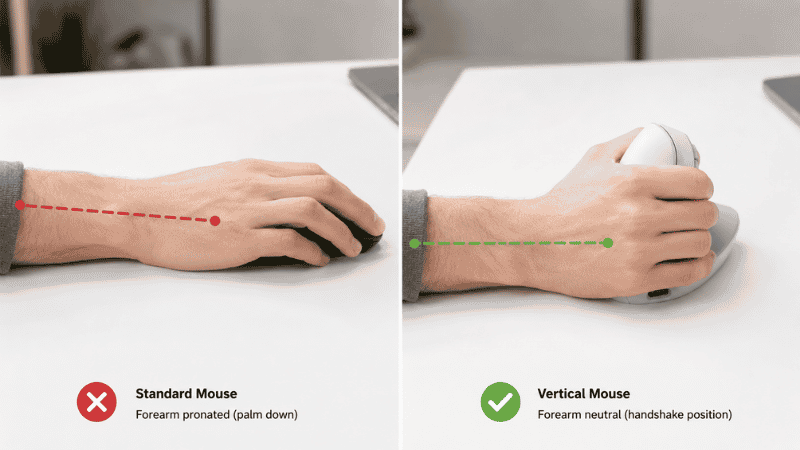
A standard computer mouse forces your hand into a pronated position — palm facing down, forearm rotated inward. Hold your arm out in front of you, palm down. Now notice what happens to your forearm: the radius and ulna bones cross each other. This crossing compresses the muscles and tendons running between them, and in sustained positions, puts pressure on the median nerve as it passes through the carpal tunnel.
A vertical mouse rotates your grip roughly 90 degrees into what ergonomists call a “handshake position” — thumb up, palm facing inward. In this position, the radius and ulna sit parallel rather than crossed. The forearm muscles are under less sustained tension. The grip feels more like holding a doorknob than pressing your palm flat against a surface.
The biomechanical logic is sound and the research supports it. A study measuring electromyography (muscle activation) in vertical versus standard mouse users found significant reductions: 28° vs 42° forearm pronation, and 13% vs 16% extensor carpi activity — measurable decreases in the muscle load that accumulates over a full working day.
The Part Most Reviews Don’t Tell You
Here’s where it gets more complicated — and where honest information matters.
A clinical review examining vertical mice and carpal tunnel pressure found that while vertical mice successfully reduce ulnar deviation and forearm pronation, they often cause users to compensate by bending their wrists backward (wrist extension). This extension can partially offset the benefits of the more neutral forearm position. The study conclusion: “The potential benefit of a neutral forearm position may have been neutralized by a more extended wrist position, which was prominent in this condition.”
A second finding from CDC-sponsored ergonomics research adds nuance: the dynamic activity of using a mouse — the clicking, gripping, and micro-movements — elevates nerve pressure significantly more than the static posture of the hand. In other words, how hard you grip and how often you click matters as much as the angle of your wrist.
What does this mean practically? A vertical mouse is a meaningful ergonomic improvement for most people — but it’s not a standalone fix. It works best as part of a broader approach that includes correct mouse positioning, softer grip habits, and regular micro-breaks. Users who switch to a vertical mouse but continue gripping tightly, positioning their mouse too far to the right, and never taking breaks may not see the benefits they expected.
This is exactly what the most experienced users in ergonomic communities have figured out. As one discussion put it: “The habits are much more important than the equipment, although they do help.”
Who a Vertical Mouse Actually Helps
Most likely to benefit:
People with forearm and wrist discomfort from sustained mouse use — specifically the ache that develops over the course of a working day and dissipates with rest. This is the classic pattern of accumulated forearm muscle fatigue from pronation, and it’s exactly what vertical mice are designed to address.
People whose mouse-related discomfort includes shoulder and neck tension. A systematic review of 17 controlled trials found that vertical mouse users experienced less neck and shoulder discomfort — the more neutral forearm position reduces the forward shoulder rotation that often accompanies standard mouse use.
People whose mouse is positioned too far to the right of their keyboard. The vertical grip naturally encourages a closer, more centered mouse position, which reduces reach-related shoulder strain.
Less likely to benefit, or may need different intervention:
People with diagnosed carpal tunnel syndrome. Clinical studies specifically testing vertical mice in CTS patients found that none of the tested ergonomic devices — including vertical mice — significantly reduced carpal tunnel pressure in this population. CTS is a medical condition requiring professional assessment; an ergonomic mouse can be part of management but shouldn’t replace it.
People whose discomfort is primarily in the fingers or thumb rather than the wrist and forearm. Vertical mice change forearm mechanics; they don’t change finger grip mechanics significantly.
People who do precision graphic work. The pointing performance research is consistent: vertical mouse users take slightly longer to reach precise targets (4.2 vs 3.4 seconds in one study) due to the unfamiliar grip angle. For creative professionals doing precise cursor work, this tradeoff may not be acceptable.
Vertical Mouse vs Regular Mouse: The Key Differences

Beyond the grip angle, a few practical differences matter for home office use.
Size sensitivity is higher with vertical mice. Because you’re gripping rather than resting your palm on the mouse, size fit matters more than with a standard mouse. A vertical mouse that’s too large forces you to extend your thumb awkwardly. One that’s too small causes you to pinch. Most vertical mice are designed for medium-to-large hands; people with smaller hands should specifically look for models marketed as “small” or “compact” vertical designs.
Scroll wheel position feels different. On a standard mouse, the scroll wheel is under your index finger. On a vertical mouse, depending on the design, it may require a more deliberate hand position. Most people adapt to this quickly, but it’s worth noting during the first week.
Desk positioning matters more. A vertical mouse positioned too far from your body still causes shoulder reach strain — the mouse orientation doesn’t fix a desk layout problem. For maximum benefit, position your mouse directly beside your keyboard, with your elbow at approximately 90 degrees and your upper arm close to your body.
Which Vertical Mouse to Get: A Practical Guide by Budget
The vertical mouse market has a clear quality ladder. Here’s where to enter it based on your situation.
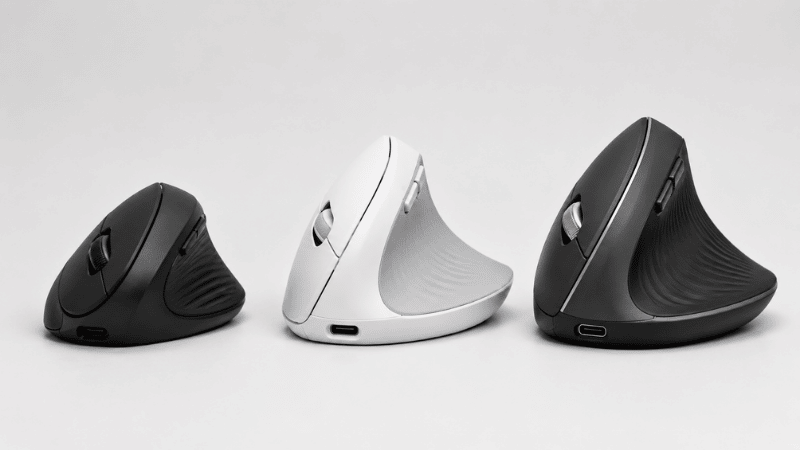
If you’re not sure yet: Start here (~$25–35)
Anker Ergonomic Vertical Mouse (~$28–35): Consistently the top recommendation in ergonomic communities for first-time vertical mouse users — specifically because of price, not because it’s the best vertical mouse available. At this price, you can try the grip style, see whether your body adapts, and decide whether to invest more without significant financial risk.
The Anker is not as refined as Logitech’s offerings — the scroll wheel is slightly stiffer and the build quality is basic — but the ergonomic geometry is sound and many long-term users have stuck with it rather than upgrading. It’s wired, which removes any latency concerns, and setup is plug-and-play.
If you’re ready to commit: The daily driver tier (~$80–120)
Logitech MX Vertical (~$95–100): The most widely used vertical mouse among remote workers who’ve committed to the format. Wireless (Bluetooth or USB receiver), excellent battery life, comfortable for medium-to-large hands, and the build quality is significantly better than budget options. The thumb rest geometry is particularly well-executed.
Tom’s Guide’s editor described it as “one of, if not the most important tech purchases I’ve ever made” after six years of daily use. That kind of long-term testimony from a hands-on reviewer carries more weight than spec comparisons.
Logitech Lift (~$70): A slightly smaller and lighter version of the MX Vertical, designed for medium and smaller hands, and available in more color options. If the MX Vertical feels too large when you handle it, the Lift is the right step down — not a compromise, just a better size match.
For specific hand sizes or clinical contexts (~$90–150)
Evoluent VerticalMouse 4 (~$90–120): The original vertical mouse design, built by the company that essentially created the category. Available in small, medium, and large right-hand versions, plus a left-hand version. The size variety makes it the best option for people whose hands don’t fit the standard Logitech sizing. Build quality is solid; the button layout is more customizable than most. Many occupational therapists recommend it specifically because of the size options.
The Adaptation Period: Why Most People Give Up Too Early

This comes up constantly in user communities. Someone buys a vertical mouse, uses it for two to three days, finds their hand cramping or their wrist at an odd angle, and returns it. Conclusion: vertical mice don’t work.
What actually happened: the muscles and tendons that control your mouse grip have years of memory for the pronated position. Switching to a vertical grip asks them to work in a completely different orientation. That’s not immediately comfortable — it’s a learning curve.
Most users report that the adaptation period runs 1–3 weeks. The first few days feel slightly awkward. By the end of the first week, it starts feeling more natural. By two to three weeks, most people report that going back to a standard mouse feels noticeably uncomfortable — which is the clearest indicator that the ergonomic shift has taken effect.
A few things that help during adaptation:
Don’t switch back and forth between a vertical and standard mouse during the adjustment period. Alternating resets the learning curve repeatedly.
Start with lower-precision tasks during the first week — email, browsing, video calls — rather than precision work that requires exact cursor placement.
Check your grip tension. New vertical mouse users tend to grip more firmly than necessary because the unfamiliar angle feels less stable. Consciously try to lighten your grip. The mouse doesn’t need to be held tightly; it needs to be guided.
If Your Wrist Still Hurts After Switching

A vertical mouse addresses one specific biomechanical problem: forearm pronation during mouse use. If your discomfort continues after switching and adapting, something else is contributing.
The most common additional factors:
Mouse positioned too far right. Your mouse should sit directly beside your keyboard, not extended outward. Many people use their mouse with their arm partially extended and slightly raised — this creates sustained shoulder tension regardless of mouse type.
Desk height too high. If your desk requires you to raise your shoulders to reach the mouse, the shoulder and neck tension from that posture will refer as arm and wrist discomfort. Your forearms should rest at or just below elbow height.
Grip tension. If you’re clicking hard and gripping firmly for hours, the muscle activity from that effort — not the static posture — is the primary source of strain. Conscious grip lightening and softer click habits matter significantly.
Insufficient breaks. Research consistently shows that the dynamic activity of mousing (clicking and moving) creates more nerve pressure than the static posture. Regular micro-breaks of 30–60 seconds every 20–30 minutes allow tissue decompression that sustained use doesn’t permit.
If discomfort persists despite environmental improvements and a properly adapted vertical mouse, see an occupational therapist or physiotherapist. Repetitive strain responds well to early professional intervention and poorly to prolonged unaddressed use.
FAQs
Does a vertical mouse really help with wrist pain? For forearm and wrist discomfort caused by sustained pronation during mouse use, yes — the evidence shows reduced muscle activation and forearm rotation. For clinical carpal tunnel syndrome, the evidence is less clear; studies have found that vertical mice don’t consistently reduce carpal tunnel pressure in CTS patients. If you have a diagnosed condition, combine ergonomic improvements with professional guidance.
How long does it take to get used to a vertical mouse? Most users adapt within 1–3 weeks. The first few days feel slightly awkward; by the second week most people report it feels more natural. Give it at least two full weeks before deciding whether it’s working. Those who quit after 2–3 days are consistently the people who report that vertical mice “don’t work.”
What is the best vertical mouse for home office use? The Logitech MX Vertical is the most consistent recommendation for everyday home office use — wireless, reliable, and well-suited to medium-to-large hands. For smaller hands, the Logitech Lift is the better fit. For first-time users unsure whether they’ll adapt, the Anker vertical mouse at ~$30 is the lowest-risk entry point.
Is a vertical mouse good for carpal tunnel? Clinical studies specifically testing vertical mice in people with diagnosed CTS found no significant reduction in carpal tunnel pressure. A vertical mouse can be part of a broader ergonomic improvement plan, but it’s not a treatment for CTS. If you have diagnosed carpal tunnel syndrome, work with a healthcare provider.
Can left-handed people use a vertical mouse? Most vertical mice are designed for right-hand use. The Evoluent VerticalMouse 4 has an explicit left-hand version. Logitech does not currently offer left-handed vertical mouse options. Left-handed users should specifically search for left-hand vertical mouse options rather than assuming standard models will work.
The Bottom Line
A vertical mouse is a legitimate ergonomic tool with real research support — and real limitations that most product pages skip over. It reduces forearm pronation and muscle activation during mouse use. It doesn’t cure carpal tunnel syndrome, and it works best as part of a broader ergonomic approach rather than as a standalone fix.
If your wrists or forearms ache after long days of computer work, it’s worth trying. Start with the Anker if you want to minimize financial risk during the adaptation period. Move to the Logitech MX Vertical if you know you’ll stick with it. Give it three weeks before deciding.
And remember what the most experienced users in ergonomic communities consistently say: the habits matter as much as the hardware. A vertical mouse with better positioning, lighter grip, and regular breaks will help you. A vertical mouse used the same way you used your old mouse, just at a different angle, probably won’t.
Related Articles on CircuitSeek
- Best Ergonomic Keyboard for Home Office →
- The Complete Home Office Setup Guide →
- Eye Strain Relief for Remote Workers →
- Standing Desk Benefits: What Research Actually Says →
- Home Office Desk Organization Ideas →
References
- Quemelo, P.R.V., & Vieira, E.R. (2013). Biomechanics and performance when using a standard and a vertical computer mouse. Ergonomics, 56(8), 1213–1221. https://pubmed.ncbi.nlm.nih.gov/23777482/
- Schmid, A.B., et al. (2015). A vertical mouse and ergonomic mouse pads alter wrist position but do not reduce carpal tunnel pressure in patients with carpal tunnel syndrome. Applied Ergonomics, 47, 151–156. https://www.sciencedirect.com/science/article/abs/pii/S0003687014001598
- Antwi-Afari, M.F., et al. (2018). Benefits of alternative computer mouse designs: A systematic review of controlled trials. Cogent Engineering, 5(1). https://www.tandfonline.com/doi/full/10.1080/23311916.2018.1521503
- CDC/NIOSH. Musculoskeletal Health Program — Computer Workstations. https://www.cdc.gov/niosh/topics/ergonomics/