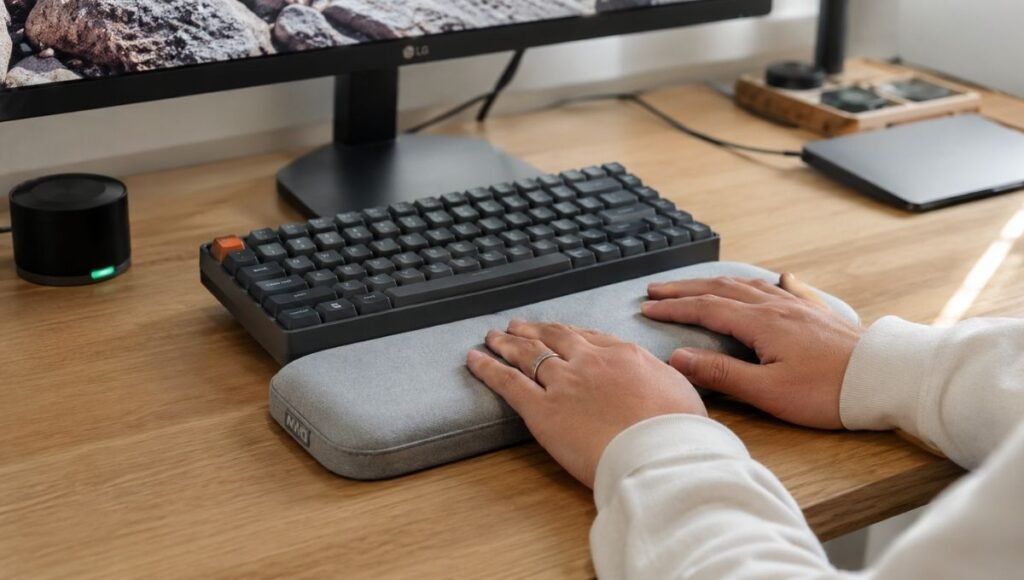
Here’s a situation that plays out more often than anyone talks about.
Someone’s wrists start aching after long typing sessions. They read that a wrist rest helps. They buy one, put it in front of their keyboard, and rest their wrists on it while they type. A few weeks later, their wrists feel about the same — or occasionally worse. They conclude that wrist rests are a gimmick, or that they bought the wrong one, or that their problem is just something they have to live with.
What usually happened is simpler: they used the wrist rest incorrectly. Not through any fault of their own — the product name is genuinely misleading. A wrist rest is not, according to ergonomics guidelines from OSHA, NIOSH, and Cornell’s Human Factors and Ergonomics research group, meant to support your wrists while you type. It’s meant to give your wrists somewhere to rest during pauses.
That distinction sounds minor. It isn’t. A wrist that’s pressing down on a rest surface while actively typing — fingers moving, tendons engaging — is under more compressive load than a wrist hovering freely. UC Berkeley researcher David Rempel found that using a wrist rest during active typing can double the pressure inside the carpal tunnel. For people who assumed the rest was helping, this is a significant reversal.
This guide explains what wrist rests actually do, how to use them correctly, whether you need one, and what to look for if you decide to buy.
Key Takeaways
- A wrist rest provides a soft surface for your wrists and palms during pauses from typing — not during active typing. Contact during active typing increases carpal tunnel pressure
- Research by UC Berkeley’s David Rempel found that wrist rest use during active typing can double the pressure inside the carpal tunnel — the opposite of the intended benefit
- The product name is misleading: “wrist rest” should more accurately be called a “palm rest” — ergonomically, the support point is the heel of your palm, not the wrist joint itself
- Wrist rest height is critical: it should match the height of the front edge of your keyboard. Too tall creates wrist extension; too short provides no benefit
- A CDC publication found that 9% of U.S. workers experience hand and wrist symptoms from repetitive computer use — making correct wrist ergonomics one of the most practically important occupational health topics for remote workers
What a Wrist Rest Actually Does (And What It Doesn’t)
The confusion starts with the name. “Wrist rest” implies something that supports your wrists. And it does — but only at specific moments.
When you’re actively typing, the ergonomically correct hand position involves your wrists floating slightly above the keyboard surface, with your forearms roughly parallel to the desk and your hands moving fluidly across the keys. In this position, your wrists aren’t resting on anything. They’re hovering. This is what allows your fingers and hands to move naturally without compressing the structures inside the wrist.
When you pause — between sentences, while you think, while you read back what you’ve written — your hands drop naturally. If there’s nothing there, they either rest on a hard desk edge (creating point pressure on soft tissue) or hover with low-level muscle activation keeping them up (creating fatigue over time). A wrist rest gives your hands somewhere soft to land during these pauses, eliminating the hard surface contact and allowing the forearm muscles to fully relax.
That’s the entire value proposition: a soft surface for rest periods, positioned at the right height. It sounds modest because it is. But those accumulated rest periods over a full workday matter, and the relief they provide is real.
What a wrist rest does not do: protect your wrists during active typing. It doesn’t reduce typing-related strain or prevent carpal tunnel if you keep your wrists pressed down on it while your fingers move. If anything, the opposite.
The Most Common Wrist Rest Mistake (And Why It Causes More Pain)
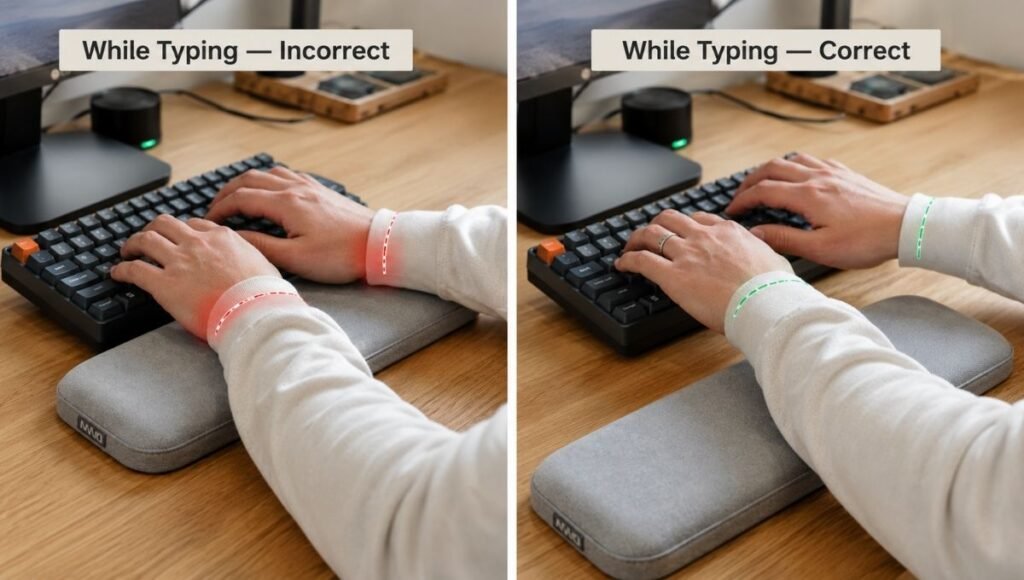
Most people who use wrist rests position their wrists on the rest and leave them there throughout their typing session. This feels more comfortable in the short term — there’s a soft surface under your wrists, which feels supportive. The problem appears over time.
When your wrists are pressed against any surface while your fingers are actively typing, you’re doing two things: compressing the soft tissue and blood vessels on the underside of the wrist (contact stress), and creating a pivot point around which your hands bend upward to reach the keys (wrist extension). Both of these are exactly what ergonomists are trying to prevent.
The Boyne Ergonomics research summary puts it directly: “The most common positioning of the keyboard and mouse rest is under the wrist. This does not eliminate pressure on the wrists. Yes, it might be softer than a desk surface but it is still contact stress.”
The counterintuitive correct technique: use the wrist rest the way you’d use a towel bar — touch it only when you stop and need somewhere to land, not while you’re actively moving. Your wrists should lift off the rest when you begin typing and return when you pause.
If you’ve been using a wrist rest the wrong way for months, this reframing may feel awkward at first. Your forearms may fatigue more quickly when they’re doing the work of keeping your hands floating. That fatigue will diminish as the muscles adapt. Give it two to three weeks of deliberate correct technique before evaluating whether a wrist rest is helping you.
Do You Actually Need a Wrist Rest?
Not everyone does. Whether a wrist rest helps depends on several factors specific to your setup.
You’re more likely to benefit from a wrist rest if:
Your keyboard sits relatively high — standard mechanical keyboards with their keycaps at 30–45mm height are the most common candidates. At that height, the keys are elevated enough that without any support surface for pauses, your hands hover at an awkward angle for extended periods.
You type for 4+ hours daily. Short sessions don’t accumulate enough fatigue for the rest benefit to be meaningful. Long sessions do.
You’re experiencing forearm fatigue or tension during work but not pain during or immediately after typing. This pattern suggests sustained muscle activation during pauses — exactly what a wrist rest addresses.
You may not need a wrist rest if:
You use a low-profile keyboard or laptop keyboard. These sit close to the desk surface, which naturally keeps your wrists in a more neutral position. A wrist rest added to a low-profile keyboard often creates more wrist extension than it relieves.
Your keyboard is on a tray set below desk height, with your forearms already parallel to the floor. In this position, wrists are naturally neutral and a rest may not add value.
You have existing diagnosed carpal tunnel syndrome or other wrist conditions. The research on wrist rests in people with existing conditions is more complicated — in some cases they help, in others (per the Rempel research) the added pressure worsens symptoms. If you have an active condition, discuss ergonomic modifications with a physiotherapist before adding accessories.
How to Choose the Right Keyboard Wrist Rest
If you’ve determined that a wrist rest makes sense for your setup, these are the specs that matter.
Height: The Most Important Factor
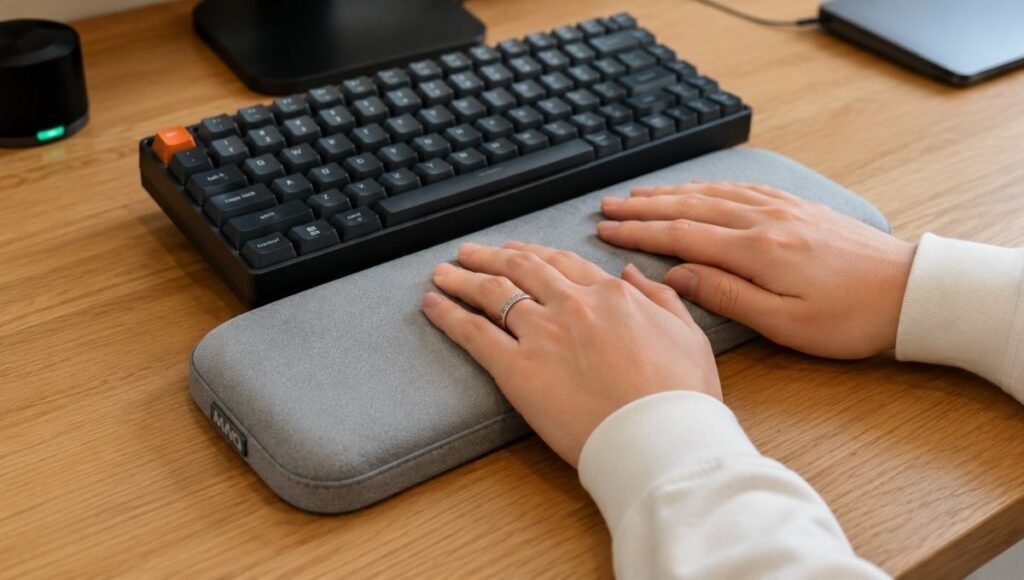
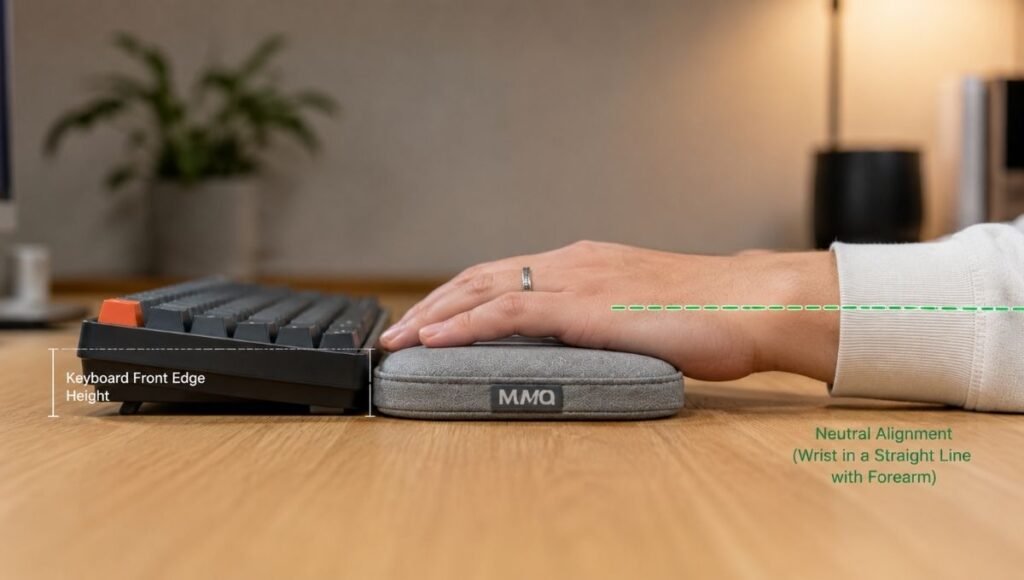
The wrist rest should match the height of the front edge of your keyboard. When your hand rests on it during pauses, your wrist should be in a neutral position — not angled up (extension) or down (flexion). A wrist rest that’s too tall forces extension; too short provides no real support.
A practical test: place the rest in front of your keyboard and rest your palm on it. Look at your wrist. It should form a straight line with your forearm. If your wrist bends upward to clear the rest height, the rest is too tall for your keyboard. If your wrist drops below the keyboard surface level, it’s too short.
For most standard mechanical keyboards, a rest in the 20–25mm height range works. For lower-profile keyboards, 10–15mm. Many manufacturers don’t list this spec clearly — if you can’t find it, look for user reviews from people with your specific keyboard model.
Material: Gel vs Memory Foam vs Hard
Gel: The most common material. Firm enough to support, soft enough to prevent contact stress. Good heat management — doesn’t trap warmth the way foam does. The downside: cheap gel rests deteriorate over time and the gel can bubble or shift. Look for gel rests with a fabric cover rather than bare vinyl, which gets sticky.
Memory foam: Softer than gel, conforms more to the shape of your palm. Better for people who find gel too firm. The risk: memory foam that’s too soft “bottoms out” — your wrist sinks through to the hard insert beneath, defeating the purpose. Look for medium-density foam, not the ultra-soft variety.
Hard/rigid (wood, metal, plastic): Found in some premium and custom mechanical keyboard accessories. Provides a consistent surface but no cushioning — contact stress reduction is minimal. Generally only appropriate for people who prefer a firm surface and are disciplined about lifting their wrists during active typing.
Length: Covering Both Hands
The wrist rest should be at least as wide as your keyboard. If it only covers half your keyboard, one hand has nowhere to go. Full-size keyboards need full-size rests (roughly 17–18 inches). Tenkeyless keyboards need proportionally shorter rests. A rest that’s too short creates an asymmetric setup where one hand has support and the other doesn’t — worse than no rest at all.
Mouse Wrist Rest: Different Problem, Same Principle
A mouse wrist rest addresses a related but distinct issue. During mouse use, the problem isn’t keystroke typing mechanics — it’s sustained arm reach and the contact between the underside of the wrist and the desk surface during mouse movement.
For mouse use, the wrist rest (or more accurately, palm rest) sits on the mouse pad rather than the desk, providing a softer surface for the part of your palm that contacts the mousing surface during use. Unlike keyboard wrist rests where the “don’t rest while active” rule is critical, mouse wrist rests are more forgiving — you’re not performing high-frequency finger movements while the wrist is in contact.
The height consideration still applies: a mouse wrist rest should position your wrist at the same height as the mouse surface, keeping your hand and forearm in a neutral line.
What to look for in a mouse wrist rest: Similar material considerations to keyboard rests — gel with fabric cover is the most durable and comfortable combination. The rest should be mobile enough that it moves slightly with your hand during large mouse movements rather than creating a fixed pivot point.
Good options at reasonable prices include the Kensington Duo Gel Wrist Rest (which covers both keyboard and mouse positions as a set, ~$20–30) and standalone options from Glorious, HyperX, and Razer for more specialized mouse wrist rests ($15–35).
Recommended Wrist Rests for Home Office Use
For most keyboard setups (~$15–30):
Glorious Gaming Wrist Rest (~$20–25): Available in multiple sizes to match common keyboard layouts (full, TKL, 60%, 65%). Medium-density foam with a fabric surface. Comfortable for extended periods, doesn’t bottom out. Strong value at the price.
Kensington Duo Gel Wrist Rest (~$25–30): Covers both keyboard and mouse positions in one purchase. Good gel density, fabric-covered. The right choice if you want matched support for both devices without buying two separate products.
Logitech Foam Keyboard Rest (~$20): Part of Logitech’s keyboard accessory line. Pairs well with Logitech keyboards where sizing is matched. Medium foam density, straightforward and reliable.
For premium or custom setups (~$35–70):
Grovemade Walnut Wrist Rest (~$65–75): Solid walnut. For people who prefer a firm natural surface and a premium aesthetic that matches a wood desk. No cushioning — appropriate only for people with correct technique who are primarily preventing desk-edge contact stress.
Keychron Palm Rest (~$30–40): Designed to match Keychron keyboard dimensions. Available in wood and leatherette finishes. For Keychron keyboard users who want a matched set.
If Your Wrist Rest Isn’t Helping After Two Weeks
If you’ve corrected your technique (lifting wrists during active typing), chosen an appropriate height, and still find your wrists are uncomfortable, the wrist rest may not be the right intervention for your situation.
The next steps to check:
Keyboard height. If your desk is too high relative to your seated elbow height, your arms are raised and your shoulders carry tension regardless of wrist rest use. Your forearms should rest at approximately elbow height when seated comfortably.
Chair height. If your feet aren’t flat on the floor or your thighs aren’t roughly parallel to the ground, the whole postural chain is off in ways that affect hand and wrist position.
Typing technique. Striking keys too hard is a surprisingly common contributor to hand fatigue. Mechanical keyboard switches require only light actuation — many people bottom out every key with more force than needed. Conscious lighter touch during typing reduces cumulative impact.
Mouse position. If your mouse is too far to the right of your keyboard, the reach and raised shoulder position creates arm and wrist tension. Move the mouse as close to the keyboard as practical.
When to See a Professional
A wrist rest addresses minor discomfort from suboptimal positioning. It doesn’t treat existing conditions.
If you experience any of the following, see a physiotherapist or occupational therapist rather than adjusting accessories:
Tingling, numbness, or cold sensations in your fingers or hand — these suggest nerve involvement that requires professional assessment.
Pain that wakes you up at night or is present when you’re not using the computer — this pattern suggests an active condition rather than simple usage fatigue.
Symptoms that have persisted for more than a few weeks despite workstation changes — professional ergonomic assessment can identify factors that aren’t obvious from self-assessment.
Swelling, visible inflammation, or weakness in the hand or fingers.
Carpal tunnel syndrome and repetitive strain injuries respond well to early professional intervention. They become significantly harder to address if left unmanaged for months.
If You Only Have 10 Minutes Right Now
Put the wrist rest you have (or a rolled-up small towel if you don’t have one) in front of your keyboard. Place your palms on it. Check your wrist angle — it should be neutral, not bent up or down.
Now type something. Notice: are your wrists staying on the rest while your fingers move? If so, try lifting them slightly so only your fingertips are above the keys and your wrists hover. Type a few sentences this way. It may feel slightly effortful — that’s normal.
The test is whether your wrists feel better at the end of a workday with this technique versus your previous approach. Give it a week of deliberate practice before evaluating.
FAQs
Do wrist rests actually help? Used correctly — during pauses rather than active typing — yes. They provide a soft surface that eliminates hard desk-edge contact stress and allows forearm muscles to fully relax during breaks. Used incorrectly (wrists pressing down while actively typing), they can increase carpal tunnel pressure and worsen the problems they’re meant to prevent.
Should I use a wrist rest while typing? No. According to OSHA, NIOSH, and Cornell ergonomics guidelines, the correct position during active typing involves hands floating above the keyboard with wrists neutral. The wrist rest is for pauses. Contact during active typing compresses wrist structures and can worsen strain.
What height should my keyboard wrist rest be? It should match the height of the front edge of your keyboard. When resting your palm on it, your wrist should form a neutral straight line with your forearm — not bent upward or downward. Too tall causes extension; too short provides no benefit.
Is gel or memory foam better for a wrist rest? Gel provides more consistent support and better heat management. Memory foam conforms more to palm shape but risks bottoming out in softer versions. Medium-density gel with a fabric cover is the most reliable choice for most users. Avoid ultra-soft foam and bare vinyl gel covers.
Can a wrist rest help with carpal tunnel? The evidence is mixed. Used correctly during pauses, a soft wrist rest can reduce contact stress that contributes to carpal tunnel symptoms. Used incorrectly during active typing, UC Berkeley research shows it can double carpal tunnel pressure. If you have diagnosed carpal tunnel syndrome, discuss ergonomic modifications with a healthcare provider before adding accessories.
The Right Tool, Used Right
A wrist rest is a small accessory that helps with a specific problem: the contact stress and muscle fatigue that comes from having nowhere to rest your hands during typing pauses. It’s not a treatment for wrist pain, not a substitute for correct keyboard height and chair setup, and not effective when used as a continuous typing surface.
If you work at a keyboard for hours every day and your hands have nowhere comfortable to land when you pause, a wrist rest solves that problem for $20–30. Set it up at the right height, use it during pauses rather than during active typing, and give your forearms time to adapt to floating freely while you type.
That’s the whole guide. Simple problem, simple solution — the complication is mostly in the name.
Related Articles on CircuitSeek
- Best Ergonomic Keyboard for Home Office →
- Vertical Mouse: Does It Actually Work? →
- Wireless Keyboard and Mouse Combo for Home Office →
- Eye Strain Relief for Remote Workers →
References
- Rempel, D., et al. Effect of wrist rest use during computer keyboard work on wrist extensor muscle activity. UC Berkeley Human Factors Research. Referenced in multiple occupational health publications including ergo-plus.com’s analysis of wrist rest research.
- OSHA. Computer Workstations eTool — Wrist/Palm Supports. https://www.osha.gov/etools/computer-workstations/accessories/wristpalm-supports
- Cornell University Ergonomics Research Laboratory. Keyboard and Mouse Ergonomics. https://ergo.human.cornell.edu/
- Centers for Disease Control and Prevention (CDC). Work-Related Musculoskeletal Disorders & Ergonomics. Referenced publication: 9% of U.S. workers experience hand and wrist symptoms from repetitive computer use. https://www.cdc.gov/niosh/topics/ergonomics/
- Boyne Ergonomics. Wrist Rests – Ergo Friend or Foe? MSc Applied Ergonomics analysis. https://boyneergonomics.ie/wrist-rests-ergo-friend-or-foe/