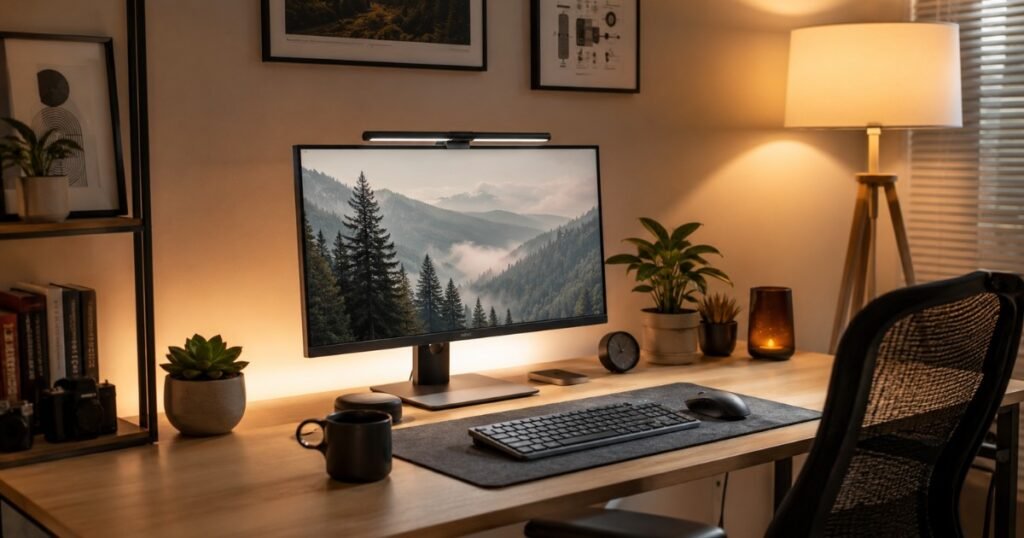
By the middle of the workday, many home offices start feeling the same.
Maybe your eyes are working harder than they should. Maybe your monitor seems uncomfortable to look at after a few hours, or your face always looks darker than everyone else’s on video calls.
It’s easy to blame the screen or assume you simply need a brighter desk lamp. More often than not, the real problem is the way light is arranged around your workspace.
In reality, most home office lighting problems have very little to do with brightness. They come from where the light is placed, how it interacts with your monitor, and how different light sources compete throughout the room.
A ceiling light can cast shadows across your workspace. A window behind your chair can turn you into a silhouette on camera. Even a powerful desk lamp can make eye strain worse if it creates glare on your screen.
The good news is that fixing these problems rarely requires a complete office makeover. In most cases, a few thoughtful adjustments—changing your desk position, adding the right task light, or balancing ambient lighting—can make your workspace noticeably more comfortable.
In this guide, we’ll show you practical ways to reduce eye strain, improve focus, build a better video call setup, and choose lighting upgrades that actually make a difference.
Why Your Current Home Office Lighting Is Making Work Harder
Signs your lighting setup is hurting productivity
The symptoms of bad office lighting are easy to mistake for other things. You think you’re tired because of a bad night’s sleep. You think your eyes are dry because of allergies. You think you’re losing focus because the work is hard.
Some of those might be true. But if any of these describe your afternoons, lighting is worth examining:
- Headaches that start around midday and ease after you step outside
- Eyes that feel strained or dry by early afternoon despite regular breaks
- Finding yourself squinting at your screen without realizing it
- Leaning forward to see text you could read fine this morning
- Looking washed out or shadowy on video calls
Each of these has a lighting explanation — and usually a straightforward fix.
Why brighter isn’t always better
The instinct when something feels off about lighting is to add more light. Another lamp. A brighter bulb. Maximum brightness on the monitor. But brightness without placement just creates new problems.
Research published in the Journal of Environmental Psychology found that it’s not the quantity of light that affects alertness and eye comfort — it’s the quality and position. A single bright overhead light in a dim room forces your pupils to constantly adjust as your gaze moves between the bright overhead zone and the darker areas of the room. That constant micro-adjustment, repeated thousands of times over a workday, is genuinely tiring in a way that accumulates without you noticing it happening.
The hidden cost of screen glare and dark surroundings
Your monitor emits light. When the room around the monitor is significantly darker than the screen itself, your eyes are constantly adjusting between two very different brightness levels. The American Optometric Association notes this contrast mismatch as a primary driver of digital eye strain — formally called Computer Vision Syndrome (CVS).
The fix isn’t dimming your screen. It’s raising the ambient brightness of the room to roughly match the screen. This sounds obvious once you hear it, but most home office setups never do it — the room stays dim, the screen stays bright, and the eyes pay for it every day.
Build a Layered Lighting Setup That Actually Works
Professional photographers and video directors have used a layered lighting concept for decades. It translates directly to home offices — and you don’t need a studio budget to implement it.
Ambient Lighting
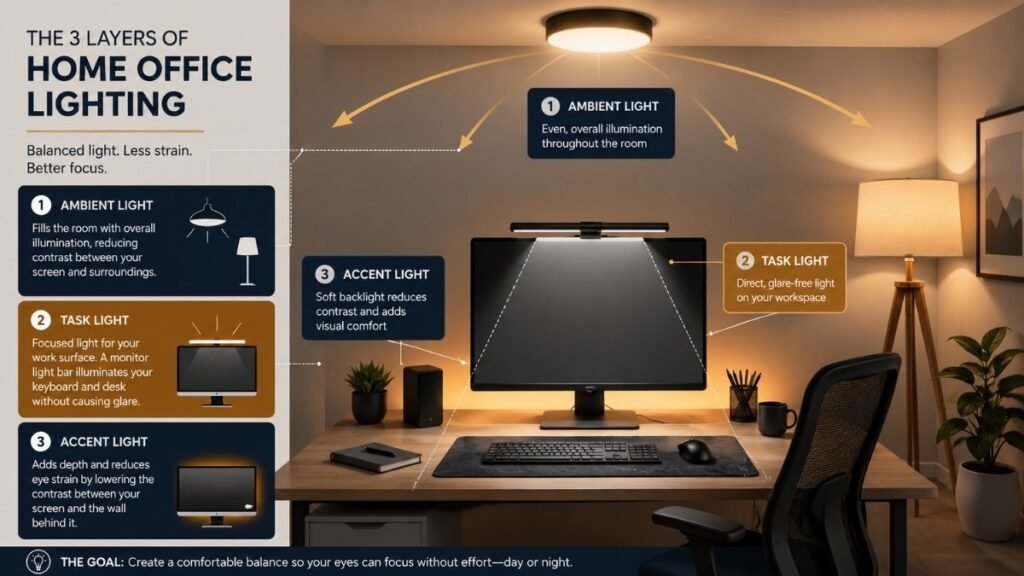
Ambient light is the base layer — the general illumination of the room that prevents harsh contrast between your screen and the surrounding environment. In a home office, this is typically a ceiling fixture, a floor lamp in the corner, or a combination of both.
The goal for ambient light: it should make the room bright enough that your monitor doesn’t appear to glow relative to the walls and ceiling. If your screen looks like the brightest thing in the room, ambient light is insufficient.
Color temperature matters here. Cool-white light (4000–5000K) is better during work hours — it replicates natural daylight and is associated with alertness. Warm light (2700–3000K) is better for evenings and unwinding. If you can only have one setting, 4000K is the most useful compromise.
Task Lighting
Task lighting is focused illumination directed at your work surface — keyboard, documents, desk. The best task lighting for a screen-based work setup is a monitor light bar rather than a traditional desk lamp.
Here’s why: a standard desk lamp positioned to the side creates a shadow across your keyboard from your own hand. It can also create a reflection or hotspot on the monitor surface if angled incorrectly. A monitor light bar clips to the top of your screen and uses an asymmetric lens to project light downward onto the desk — illuminating your keyboard and any papers without hitting the screen surface at all.
The first time you switch on a monitor light bar, you won’t think “this is brighter.” You’ll think “why is there less glare?” That’s the asymmetric lens doing its job. The BenQ ScreenBar (~$50) is the benchmark product in this category — clips on in 30 seconds, no cables on the desk, automatic brightness sensor.
Accent Lighting
Accent light is the layer most home offices skip entirely — and it’s the one that often makes the biggest visible difference, both for how the space looks and how it reads on video calls.
Bias lighting — a strip of LEDs behind your monitor — reduces the contrast between the bright screen and the wall behind it, which directly reduces eye strain during long screen sessions. A $15–20 LED strip stuck to the back of your monitor makes the space feel intentional and measurably reduces the visual fatigue that comes from high screen-to-background contrast.
For video calls, accent lighting also determines whether your background looks flat and dark or has depth and warmth behind you. A small lamp or warm LED strip in the background of your video frame makes a subtle but real difference to how the call feels for the people you’re talking to.
How the three work together
Think of it as a system: ambient light keeps the room at a comfortable base brightness. Task light (monitor bar) illuminates your work surface without glare. Accent light (bias lighting, background lamp) reduces screen contrast and adds depth to the space.
Each layer does something the others can’t. A monitor bar without ambient light leaves the room dark and increases overall contrast. Ambient light alone doesn’t address desk shadows. Accent light alone is atmospheric but not functional. The combination is what makes the setup work.
Position Your Desk for Better Natural Light (Without Fighting the Sun)
Natural light is the best ambient light available — free, full-spectrum, and genuinely better for alertness and mood than any artificial alternative. The challenge is that it’s also directional, variable, and capable of creating serious problems if your desk is positioned relative to it incorrectly.
Best desk placement near a window
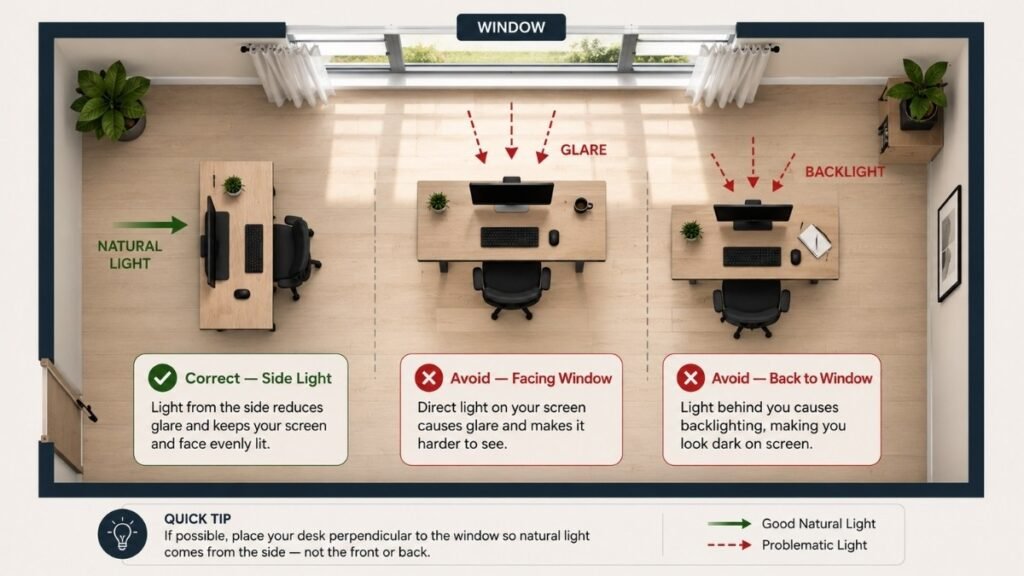
The ideal position: desk perpendicular to the window, with natural light entering from the side. This gives you the benefits of daylight — brightness, full spectrum illumination — without direct glare on your screen or in your eyes.
Avoid sitting directly in front of a window
Sitting with a window in front of you means staring into the light source while trying to see your screen. Even with the window not in your direct line of sight, the brightness differential causes squinting and eye fatigue. If this is your current setup, moving the desk 90 degrees is the single highest-impact change you can make.
Avoid sitting with your back to the window
Light entering from behind you bounces off your screen. On a matte monitor, this creates diffuse glare. On a glossy screen, it can make parts of the display nearly unreadable. It also creates the silhouette problem on video calls — the camera exposes for the bright window behind you and your face goes dark.
The ideal setup for Zoom and Teams meetings
Natural light from the side works for general focus work. But for video calls, front-facing natural light is ideal — the window is in front of you, off to one side, illuminating your face without putting you in direct glare. Sheer curtains diffuse direct sunlight into soft, flattering light that cameras render well. If you have a window you can position in front of you during calls, even partially, it’s worth rearranging for.
Quick fixes if you can’t move your desk
If your desk position is fixed — you’re in a corner, the room layout doesn’t allow for adjustment — there are workarounds. A blind or sheer curtain on the problem window diffuses direct glare without losing the ambient benefit of daylight. Increasing indoor ambient light to balance the window’s contribution reduces contrast. And a key light (covered in the video call section below) can compensate for almost any natural light positioning problem during calls.
How renters can improve lighting with curtains and lamp placement alone
You don’t need to drill anything or permanently alter the space. Sheer curtains on tension rods filter direct sunlight. A floor lamp positioned in the corner opposite your desk raises ambient brightness. A clip-on monitor light bar requires no installation. An LED strip with adhesive backing goes behind the monitor and peels off cleanly. These four changes — all reversible, all renter-friendly — cover the most common home office lighting problems without touching the walls.
Reduce Eye Strain with the Right Task Lighting
Why desk lamps often create glare
Standard desk lamps are designed to illuminate a flat work surface — a book, a sheet of paper, a sketchpad. They do this by shining light downward and slightly outward from a point source. The problem is that the point source creates a single bright spot and shadows in all directions from it, including across the keyboard and desk surface directly in front of the screen.
Positioned to the right of your monitor (for right-handed users), a desk lamp also creates a reflection point on the left side of many monitor surfaces. Not always visible as a distinct hotspot — sometimes just a mild brightness that the eye continuously tries to resolve against the screen.
Monitor light bars explained
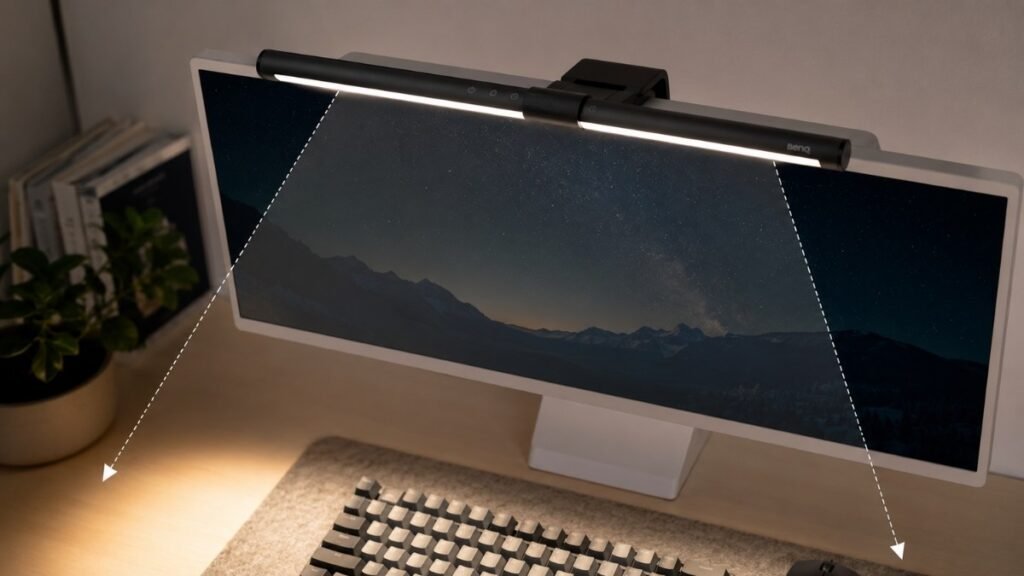
A monitor light bar clips to the top of your screen. The key engineering feature is the asymmetric lens — it projects light downward and forward (toward you and your desk), not backward toward the screen surface. This means your desk is illuminated, your keyboard is visible, and the screen surface receives none of the light that would cause glare.
The practical result: your screen stays clear, your desk is lit, and there’s no light source positioned to create problematic reflections. For most home offices with a flat monitor and a keyboard setup, this is the best task lighting option available. The BenQ ScreenBar (~$50) is the benchmark; the BenQ ScreenBar Halo (~$100) adds bias lighting behind the monitor as a single unit.
Asymmetrical lighting technology
The asymmetric optic is what separates a monitor light bar from simply balancing a lamp on top of the monitor. Without it, any overhead light source would reflect directly off the screen. The asymmetric lens directs light specifically forward and down — the physics are simple but the practical difference is significant.
When a traditional desk lamp is still the better choice
For a desk without a monitor — a writing desk, a standing drafting surface, or a secondary table for reading — a traditional adjustable desk lamp is still the right tool. It provides more flexible positioning and can be moved to illuminate specific tasks that a fixed monitor bar can’t reach. A desk lamp with adjustable color temperature (3000–6500K range) and brightness is the most versatile option for these setups.
Look Better on Video Calls Without Buying Expensive Studio Lights
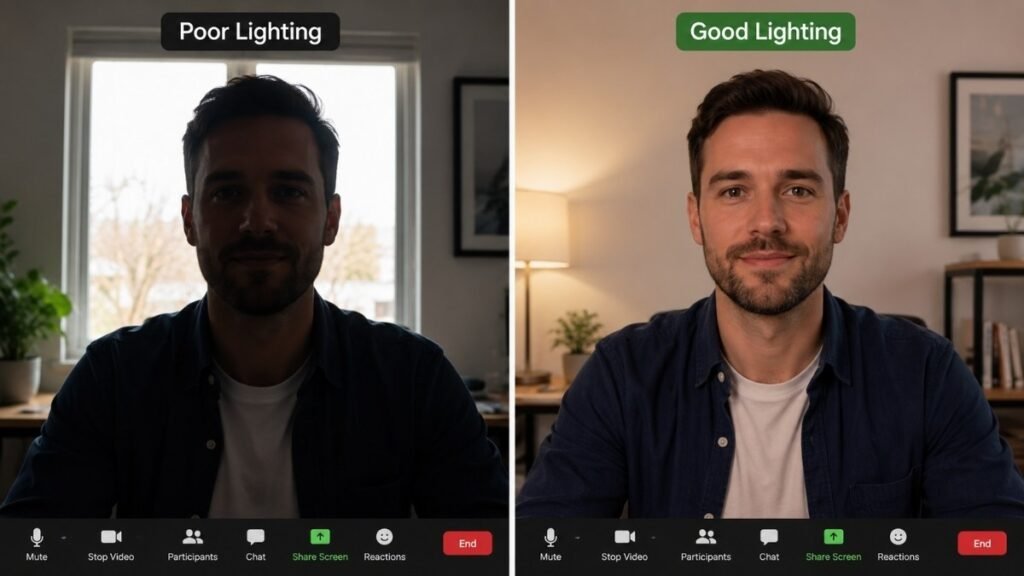
Bad video call lighting is one of the most common and most overlooked home office problems. Not dramatic bad lighting — just the subtle wrong: the window behind you silhouetting your face, the overhead light casting shadows under your eyes, the screen glow making you look washed out in a dark room.
The biggest lighting mistakes on Zoom
The silhouette: A bright window behind you. The camera exposes for the window and your face goes dark. You look like you’re in witness protection.
The top-down shadow: Ceiling lights directly above cast shadows under your eyes, nose, and chin. You look tired even when you aren’t.
The ghoul effect: Screen glow in a dark room lighting your face from below. This one is unsettling in ways that are hard to articulate.
The side-shadow: One lamp too far to one side creates dramatic half-face lighting that reads as “intense” in a professional context.
Bounce light off the wall
The easiest free improvement for video call lighting: point a desk lamp toward the wall in front of you (the wall the camera faces) and let the light bounce back. The wall becomes a large, diffuse light source — much softer and more flattering than direct lamp light. No additional equipment required. Works with any lamp you already own.
Best lamp position for your face
Your main light source for calls should be in front of you, slightly above eye level, angled downward toward your face. Position it 30–45 degrees to the side of your camera rather than directly in line — this creates soft modeling shadows that make your face look three-dimensional rather than flat.
Ring light vs desk lamp
Ring lights are popular because they’re affordable and create even, circular illumination. The downside: the circular catch-light reflection in glasses is distinctly unflattering and immediately identifiable as “ring light user.” If you wear glasses, skip the ring light.
A rectangular LED panel (like the Elgato Key Light Air, ~$130) provides the same flattering front light without the circular reflection. A good desk lamp bounced off the wall achieves a similar effect for free.
Use your monitor as a soft fill light
If your monitor is bright and directly in front of you, its screen glow is already contributing soft fill light to your face. On a Zoom call where the camera can see your face, this isn’t always a bad thing — it creates a subtle base illumination. The issue is when the monitor glow is the only front-facing light, which creates an unnatural blue-cast effect. Use it as supplementary fill, not a primary source.
No Windows? Here’s How to Brighten a Dark Home Office
Many home offices live in spare bedrooms, basement rooms, or interior spaces with no natural light. This creates both a functional lighting problem (you need adequate illumination) and a psychological one (windowless spaces affect mood and alertness in ways that matter over a full workday).
Simulate daylight
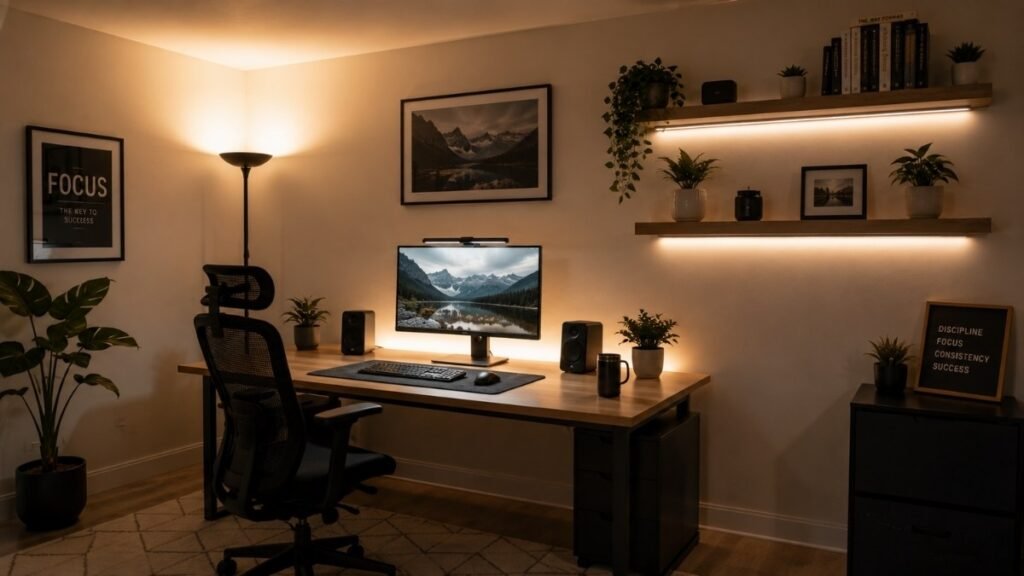
Full-spectrum, daylight-temperature bulbs (5000–6500K, CRI 90+) are the best substitute for natural light in windowless spaces. High CRI (Color Rendering Index) means colors appear more accurate and natural under the light — the visual environment feels closer to outdoor conditions, which matters for sustained attention and mood.
Use upward-facing floor lamps
A floor lamp positioned in the corner behind or beside you, pointed upward at the ceiling, creates indirect ambient light that fills the room evenly without creating hotspots or glare. This indirect, bounced light is gentler on the eyes than direct light sources and makes a room feel larger and less enclosed.
Choose high-CRI bulbs
Standard LEDs often have a CRI of 70–80. For home office use, particularly in windowless spaces, look for CRI 90+ bulbs. The difference is visible — colors are truer, the light feels less artificial, and eye fatigue over long sessions is measurably lower. Most major LED brands offer high-CRI options without significant price premium.
Add indirect background lighting
LED strips run along the top of bookshelves, along the base of cabinets, or around the ceiling perimeter create soft, diffuse ambient light from multiple directions. This fills in the dark zones that a single overhead light misses and dramatically reduces the “cave effect” that makes windowless spaces feel claustrophobic.
Reduce the “cave effect”
The cave effect — the sense of being enclosed in a small, dark space — comes primarily from dark walls and low ambient light. White or light-colored walls reflect light rather than absorbing it, effectively multiplying the impact of your light sources. If you can’t paint, a large mirror on the wall opposite your primary light source has a similar effect.
Mental benefits of brighter spaces
Research on light exposure and mood is consistent: daylight-spectrum light during work hours improves alertness, reduces fatigue, and is associated with better mood compared to dim or warm-tinted artificial light. For people working full-time in windowless spaces, this isn’t trivial — it compounds across hundreds of working days. The investment in proper full-spectrum lighting is as much about sustained wellbeing as it is about eye comfort.
Use Smart Lighting to Separate Work Time from Personal Time
Why lighting affects your brain
Your brain uses light as one of its primary signals for time of day. Bright, cool light signals daytime and promotes alertness. Warm, dim light signals evening and promotes relaxation. In a home office where work and personal life share the same physical space, lighting can be a practical tool for creating that separation.
Best color temperature for focus
4000–5000K during work hours. This range replicates natural daylight well enough to support the alertness patterns associated with daytime work. The further you get from natural daylight’s spectrum during work hours, the more you’re fighting your own biology.
Best color temperature after work
2700–3000K. Warm, incandescent-temperature light. The shift to warmer light in the evening is not just atmospheric — it reduces blue light exposure that would otherwise suppress melatonin and delay sleep onset.
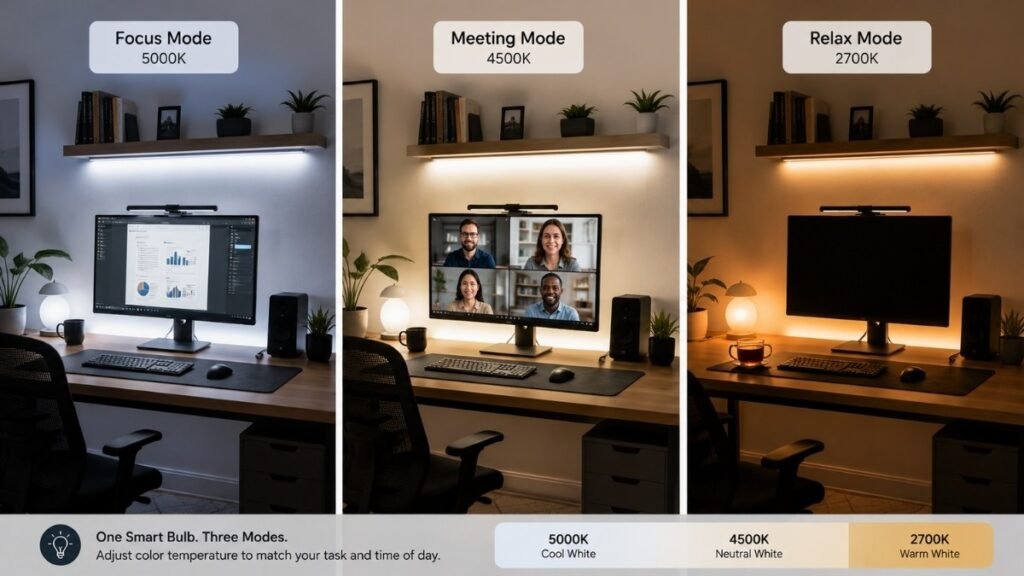
One pattern that works well: set a smart bulb to shift from 5000K to 3000K automatically at 6 p.m. The lighting change becomes a passive cue that the workday is ending — especially useful for remote workers who struggle to mentally “leave the office.”
Create one-tap lighting scenes
Smart bulbs from Philips Hue, IKEA TRÅDFRI, or Govee allow you to create preset scenes activated with a single tap or voice command:
Focus Mode: 4500K, 80% brightness. For deep work, writing, and tasks requiring sustained attention.
Meeting Mode: 5000K, full brightness. For video calls — bright enough to look professional on camera, cool enough to render skin tones accurately.
Reading Mode: 3500K, 60% brightness. For reading documents, research, or lighter work in the afternoon.
Relax Mode: 2700K, 30% brightness. Post-work evening transition. The shift from desk-bright to lamp-warm is the signal that work is done.
Many remote workers report that the act of switching lighting scenes — not just turning off the computer — is what actually helps their brain transition out of work mode. It’s a small ritual, but rituals work.
Home Office Lighting Gear Worth Buying
Best monitor light bar
BenQ ScreenBar (~$50): The benchmark. Clips to any flat monitor, automatic brightness sensor, asymmetric lens eliminates screen glare. Replaces a desk lamp for most users. The BenQ ScreenBar Halo (~$100) adds bias lighting behind the monitor — if you want both task lighting and bias lighting in one unit, it’s the cleaner solution.
Best adjustable desk lamp
Elgato Key Light Air (~$130): Technically marketed as a video call key light, but it functions as an excellent adjustable desk lamp with 2900–7000K range, app control, and 1400 lumens. Does double duty as task lamp and video call light. Overkill if you’re only using it as a desk lamp; perfect if you’re on video calls regularly.
Govee LED Desk Lamp (~$30–40): For pure desk lamp use without video call requirements. Adjustable color temperature, decent build quality, USB-C charging port. Solid budget option.
Best smart bulb
Philips Hue White Ambiance (~$25 per bulb): 2200–6500K range, reliable app control, Alexa and Google Home compatible. The ecosystem is well-developed and the scene creation is straightforward. If you’re building a smart lighting setup from scratch, Hue is the most reliable ecosystem.
IKEA TRÅDFRI (~$10–15 per bulb): Significantly cheaper, requires the IKEA hub ($35) but the per-bulb cost drops considerably for multi-bulb setups. Less polished app but fully functional. Good choice for budget-conscious setups.
Best LED light strip (bias lighting)
Govee TV LED Backlight (~$15–20): Adhesive-backed LED strip that attaches to the back of your monitor. Warm white or adjustable color. The most affordable way to add bias lighting and directly reduce eye strain from screen contrast.
Philips Hue Play (~$70–80): The premium bias lighting option. Pairs with the Hue ecosystem, can be set to match your on-screen content, and includes proper mounting hardware. Significantly more expensive than a basic LED strip for the same fundamental function.
Best floor lamp
TaoTronics Floor Lamp (~$40–60): For indirect ambient lighting in a windowless or dark corner office. Tall, directs light upward, adjustable brightness and color temperature. Does the job without visual noise.
Best budget setup under $100
BenQ ScreenBar ($50) + a pack of 4000K LED bulbs for existing fixtures ($15) + a Govee LED strip for bias lighting ($15) = complete functional setup for $80. Eliminates the most common lighting problems — glare, screen contrast, inadequate ambient light — without smart home infrastructure or expensive fixtures.
Best premium setup
BenQ ScreenBar Halo ($100) + Elgato Key Light Air ($130) + Philips Hue White Ambiance bulbs throughout the room ($100–150 depending on fixture count) = full layered lighting with smart control, proper video call illumination, built-in bias lighting, and programmable scenes for focus, meeting, reading, and relax modes.
Common Home Office Lighting Mistakes
Using only one light source
A single light source creates hard shadows and high contrast. It’s the most common setup and the one that causes the most problems. Every home office benefits from at least two light sources — one ambient, one task.
Overhead light only
Ceiling lights illuminate the top of your head, not your face or desk surface. They also create shadows directly where you need light most. They’re useful as ambient fill but not as primary task lighting.
Wrong bulb color temperature
Warm white (2700K) bulbs are good for living rooms and bedrooms. They’re counterproductive for work — the warm spectrum is associated with relaxation, not focus. During work hours, 4000–5000K is the functional range.
Monitor facing the window
The window becomes a backlight for your screen. Glare, reduced contrast, difficulty reading the display, and a silhouette problem on video calls — all preventable by rotating the desk 90 degrees.
Ignoring background lighting
What’s behind you on video calls matters. A plain dark wall reads as unprepared. A warm lamp or bias-lit shelf behind you adds depth and makes your background feel considered rather than accidental.
Buying the brightest bulb possible
CircuitSeek Editor’s Note: Don’t do this. Brightness without placement creates more glare, not better visibility. A 2700 lumen flood bulb pointed at your monitor from behind will make your workday actively worse than a 400 lumen LED strip positioned correctly. Position first, brightness second.
Final Thoughts
Build Better Light, Not Just a Brighter Desk
There’s no such thing as a perfect home office.
Some people work in a spare bedroom. Others squeeze a desk into the corner of a living room. Plenty of us are simply making the best of the space we have.
Good lighting isn’t about copying someone else’s setup—it’s about making your own space easier to work in.
If your workspace feels more comfortable after today’s changes, you’ve already made the right upgrade.
The Desk You Can Work at All Day
Great home office lighting isn’t about buying the most expensive lamp.
It’s about placing light where your eyes, workspace, and daily routine actually need it. Small adjustments — changing desk position, adding a monitor light bar, switching color temperature after work — often make a bigger difference than a complete room makeover.
CircuitSeek Tip: Before buying another desk lamp, spend five minutes turning off every light in your workspace and rebuilding the setup one layer at a time. Add ambient first. Then task. Then accent. Many lighting problems come from placement, not from a lack of brightness — and rebuilding from scratch makes the problem obvious.
The goal isn’t a perfectly lit studio. It’s a workspace where you can sit for eight hours and feel like the space was working with you rather than against you.
A workspace doesn’t have to look perfect to work better. It just needs to work better for you.
💡 CircuitSeek Editor’s Notes: Why This Guide Focuses on Practical Lighting
Unlike many lighting guides that focus on expensive renovations or professional studio setups, this article is built around real home office challenges.
Our recommendations prioritize:
💡 Eye Comfort & Ergonomics
Based on digital eye strain research, workstation ergonomics, and practical desk lighting principles.
🖥️ Remote Work & Video Calls
Lighting solutions that improve both everyday productivity and how you appear on Zoom, Teams, and Google Meet.
🏠 Renter-Friendly Upgrades
Most suggestions require no rewiring, no permanent installation, and can be completed with affordable plug-and-play equipment.
Rather than chasing the brightest workspace, the goal is to create one that’s comfortable enough to support hours of focused work—day after day.
Continue Improving Your Home Office
Lighting is only one part of a productive workspace.
These guides can help you build a healthier and more efficient home office:
- The Complete Home Office Setup Guide →
- Eye Strain Relief for Remote Workers: What Actually Works →
- Desk Organization Ideas That Actually Stick →
- Small Home Office Ideas That Work in Any Space →
- Do Blue Light Glasses Work? What the Research Actually Says →
At CircuitSeek, we believe the best workspace isn’t the one with the most gadgets—it’s the one that helps you stay comfortable, focused, and productive every day.