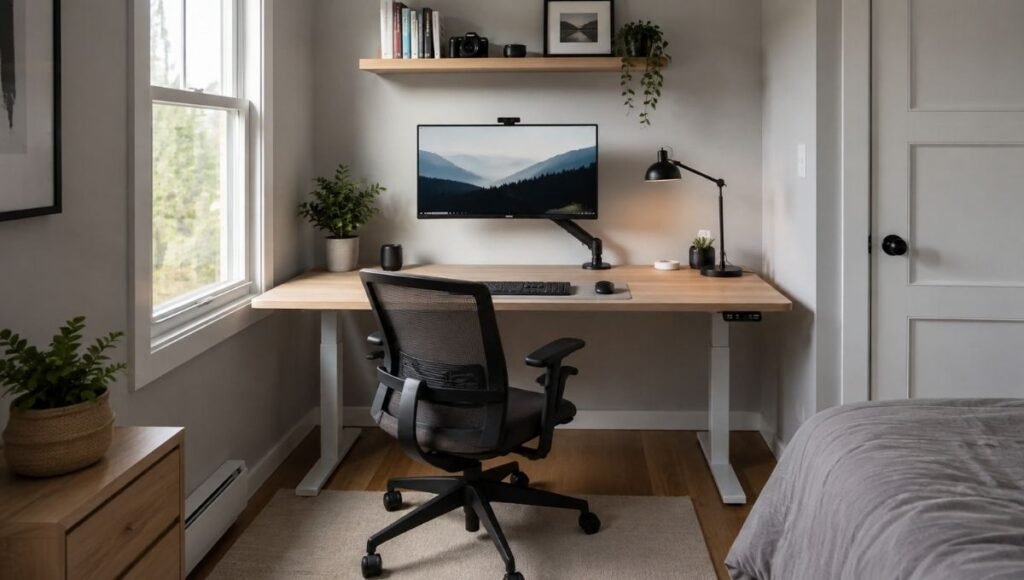
The desk that looks perfect in the showroom has a way of taking over a small room.
You measured the wall. You measured the desk. It fits — technically. But once it’s in the room with a chair pulled out, there’s barely space to walk around it. The monitor ends up closer to your face than it should be because there’s no depth left. The cable management you planned doesn’t work because the desk sits too close to the wall. You spend the next two years tolerating a setup that’s almost right but never quite comfortable.
This is the most common small home office desk mistake: buying for the wall space available rather than buying for the total footprint including the chair, the person using it, and the actual working distance from devices.
The good news is that a properly sized small desk — matched to your specific equipment and room — works better than a large desk squeezed into the same space. The question isn’t “what’s the biggest desk that fits?” It’s “what’s the smallest desk that lets me work well?” Those are different questions with different answers.
This guide gives you the measurements, the shape decisions, and the setup choices that make a small home office desk actually work.
Key Takeaways
- The minimum practical desk size for a laptop-only home office is 36 inches wide × 22 inches deep; for a single external monitor setup, 48 inches wide × 24 inches deep is the functional minimum — below these dimensions, you’ll find yourself working in compromised positions
- You need at least 36 inches of clearance behind your chair to push back, stand up, and move comfortably; measure from the back of your desk to the nearest wall or obstacle and subtract 36 inches — that’s your actual available desk depth
- A corner or L-shaped desk is often the most space-efficient choice for small rooms — it uses wall corner space that’s otherwise unused and provides more total surface area than a straight desk of equivalent footprint
- A monitor arm ($40–80) can make a 40-inch desk function like a 50-inch desk by reclaiming the footprint previously occupied by a monitor stand — one of the highest-value small desk accessories
- According to BIFMA ergonomic guidelines (G1-2013), a desk must allow neutral joint positioning for the 5th to 95th percentile of adult users — this translates to a minimum of 24 inches of depth for proper monitor distance and keyboard positioning
Start With Your Equipment, Not Your Room
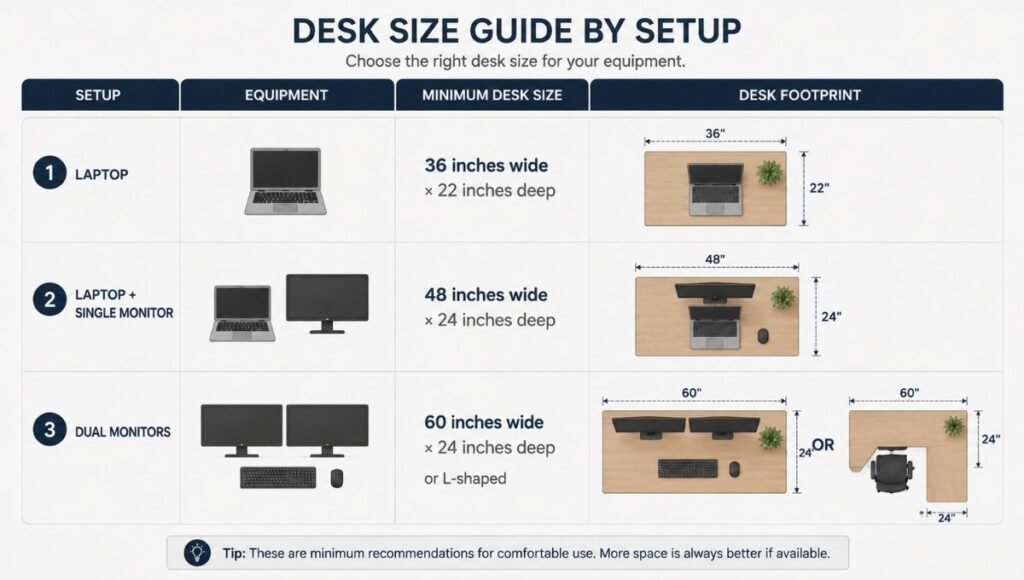
Most people measure their room first and then look for a desk that fits. The more reliable sequence is to measure your equipment first — specifically, what needs to sit on the desk and how much space each thing requires.
Laptop only: You need significantly less desk than most people assume. A laptop needs 12–14 inches of depth (the laptop itself) plus 10–12 inches of space between the laptop and your face for comfortable viewing distance. Width-wise, a laptop at about 13–15 inches wide needs space on both sides for a mouse and a notebook. A 36-inch wide × 22-inch deep desk handles this comfortably with some margin.
Laptop plus external monitor: The external monitor changes the calculation. The monitor needs to sit far enough from your eyes — at least 20 inches for a 24-inch monitor, 24–28 inches for a 27-inch monitor. The keyboard and mouse position in front of the monitor. This requires at least 24 inches of depth and 48 inches of width for a comfortable, ergonomically correct setup.
Dual external monitors: Now you need 60+ inches of width to avoid extreme neck rotation between screens. At this point, an L-shaped desk often provides more practical working surface than a long straight desk while using a corner rather than a full wall.
Desktop computer: If you have a tower that sits on or near the desk, account for its footprint (typically 7–8 inches wide × 16–18 inches deep) in your total calculation. Many people tuck the tower under the desk, which works well and reclaims surface space.
The practical check: list everything that needs to sit on the desk surface and measure the combined width and depth those items require. That’s your minimum working surface. The desk you buy needs to be at least that size — ideally with 6–8 inches of margin on each dimension.
How to Measure Your Room for a Small Home Office Desk
The sequence that prevents the most common mistakes:
Measure the available wall length. This gives you the maximum desk width. But don’t use that full length — leave at least 6–8 inches on each side for visual breathing room and cable access.
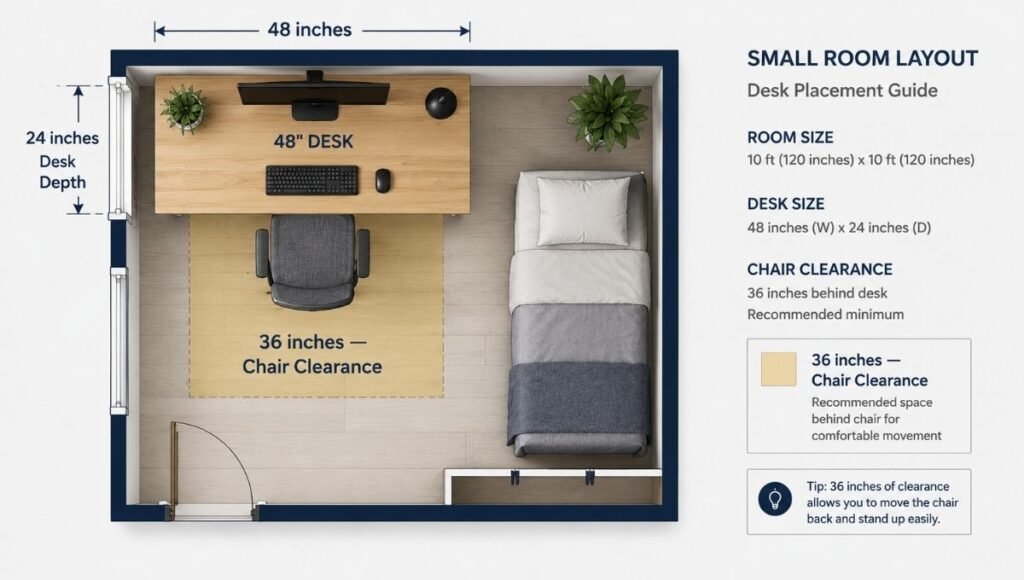
Measure from wall to the chair clearance line. Stand in the position where your chair will sit. Mark where the chair back reaches when pushed back to stand up. Measure from that mark to the wall behind the desk. This tells you the maximum desk depth. If that number is less than 22 inches, the space may be too shallow for a functional workstation.
Confirm the 36-inch clearance behind the chair. From the back edge of where the desk will sit, measure 36 inches outward — this is the minimum chair clearance zone. Everything beyond that 36 inches is living space, not desk space. In a 10-foot deep room, a 24-inch deep desk plus 36 inches of chair clearance uses 60 inches of depth, leaving 60 inches of remaining room — typically enough if the room is also used for sleeping or other purposes.
Check the corner. If you have a corner available in the room, measure both walls meeting at that corner. Even a modest 8-foot × 10-foot room typically has a corner that can accommodate a corner desk or small L-shaped configuration, which provides more total surface than a straight desk while using space that would otherwise hold nothing.
Small Home Office Desk Shapes: Which One Fits Your Situation
Straight Desk (Rectangle)
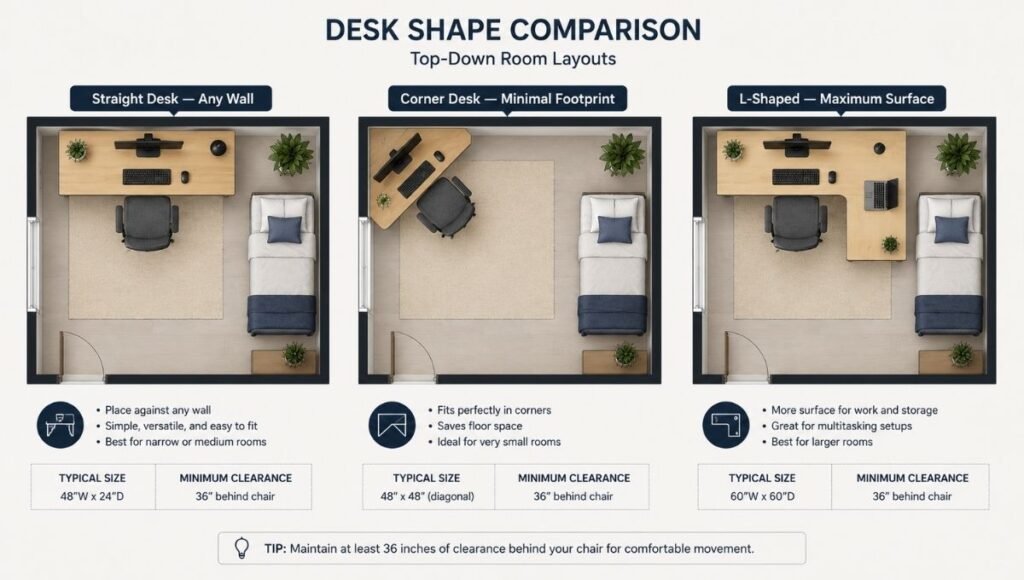
The most common and most versatile option. Places against any wall. Available in widths from 36 to 72 inches. Easy to position, easy to move.
Best for: Bedroom offices, living room setups, and any space where a corner isn’t available or where the desk needs to move easily. Straight desks also work well in narrow rooms where depth is limited but wall length is available.
Minimum useful size: 40–48 inches wide × 22–24 inches deep. Below 40 inches, a single monitor setup becomes cramped. Below 22 inches deep, the viewing distance from a monitor is too short for comfortable extended use.
The most common mistake: Buying a straight desk that’s too narrow — 36 inches feels spacious until you add a monitor, keyboard, mouse, and a lamp, at which point the working area is gone. Unless you’re using a laptop exclusively, 48 inches is a more practical minimum.
Corner Desk
A triangular or pentagon-shaped desk that fits into a room corner. Uses the corner space that would otherwise be unused. Typically provides 40–50 inches of surface on each side of the corner.
Best for: Rooms where the desk needs to be as unobtrusive as possible. Corner desks have a relatively small visual footprint in a room because they tuck into the corner rather than interrupting the wall. A 36-inch × 36-inch corner desk in a bedroom corner feels much less room-dominating than a 48-inch straight desk against a wall.
The limitation: Corner desks often have a dead zone at the corner itself — the deepest part where the two sides meet is typically too far to reach comfortably and often goes unused. Plan for this and don’t count on the corner as your primary working area.
L-Shaped Desk for Home Office
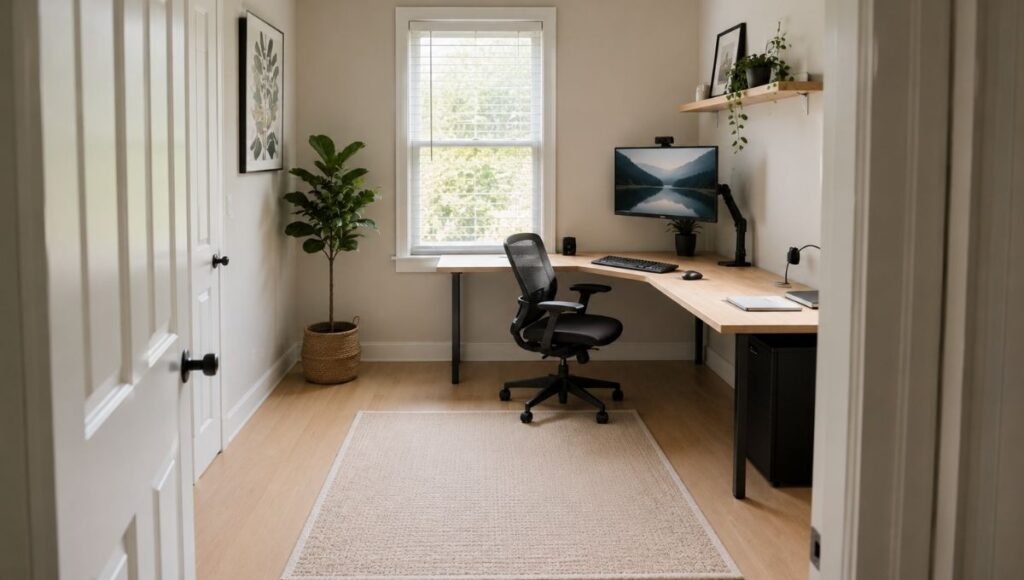
Two perpendicular surfaces — a primary working zone and a secondary zone — connected at a corner. Typically 48–60 inches on the longer side and 36–48 inches on the shorter side.
Best for: People who need more total surface than a straight desk provides, and who have a usable corner in the room. An L-shaped desk in a corner uses approximately the same floor area as a straight desk but provides significantly more working surface.
Particularly effective when: You need separate zones for your computer setup and for writing, reference materials, or a secondary task. One side handles the monitor and keyboard; the other handles everything else.
The size consideration: In a small room (10×10 feet or smaller), a full-size L-shaped desk can feel overwhelming. Look for compact L-shaped configurations — 48 × 36 inches rather than 60 × 48 inches — which provide the L-shape advantage without the large footprint.
Wall-Mounted or Floating Desk
A surface attached directly to the wall with no legs or base. Can be folded up when not in use in some configurations.
Best for: Very small spaces where every square foot matters, or spaces where the desk is only used part-time (a desk in a bedroom used for work that needs to visually disappear in the evening).
The practical limitation: Wall-mounted desks are typically 18–24 inches deep, which is functional for laptop-only use but challenging for an external monitor setup at the proper viewing distance. Cable management is also more complex with a wall-mounted desk. For full-time remote workers, a floor-standing desk usually provides a better daily working experience.
The Accessories That Make Small Desks Work Better
Several accessories expand the effective working area of a small desk without changing its footprint.
Monitor Arm ($40–80)
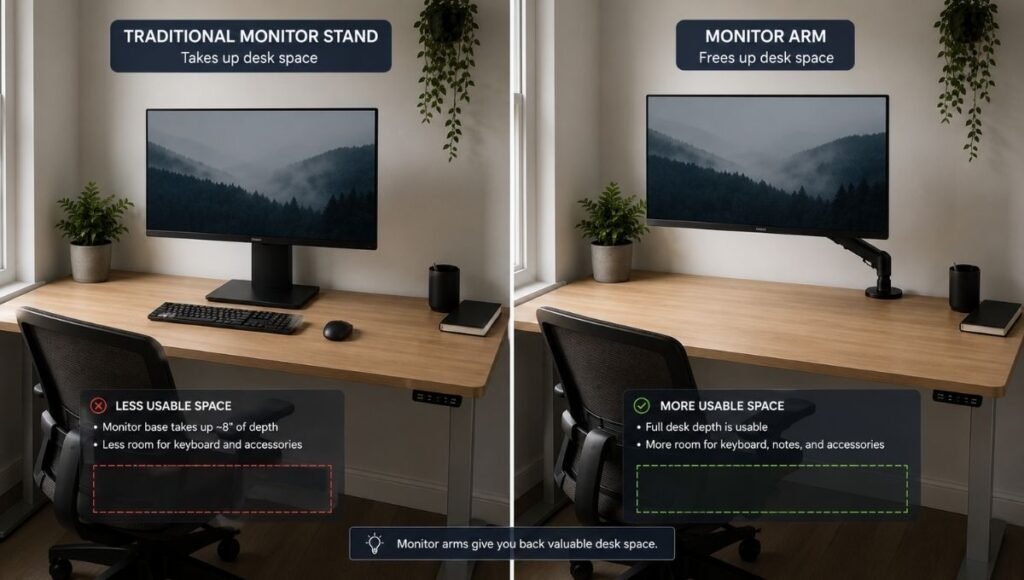
The single highest-impact accessory for a small home office desk. A monitor arm removes the monitor stand from the desk surface — reclaiming typically 8–10 inches of depth that the stand base was occupying. This is often the difference between a 40-inch desk that feels cramped and the same desk that feels workable.
Cornell University’s Ergonomics Research Lab notes that monitor height and distance are critical for neck health — a monitor arm lets you achieve the exact correct position (top of screen at eye level, 20–28 inches from face) that a fixed monitor stand may not allow on a shallow desk.
Vertical Monitor Stand (for single monitor setups)
If a monitor arm isn’t in the budget, a monitor riser that elevates the screen and provides storage underneath ($20–30) reclaims some surface area. Not as flexible as an arm, but useful for fixed single-monitor setups.
Under-Desk Storage
A small desk by definition has limited surface area. Under-desk storage — a 2-drawer pedestal, a rolling file cabinet, or a small shelf unit that fits beneath the desk — adds storage without consuming surface space. Particularly useful in rooms without other storage options.
Laptop Stand (for laptop-plus-monitor setups)
If you use a laptop alongside an external monitor, a laptop stand raises the laptop screen to a secondary display level while keeping its footprint compact. Laptops on stands with a small stand can be positioned to the side of the monitor, making efficient use of the available desk width.
Home Office Writing Desk vs Computer Desk: Is There a Difference?
The terms get used interchangeably, but there’s a practical distinction worth knowing.
A writing desk is typically a straight, flat surface without cable management features, monitor shelves, or keyboard trays. Usually 48–60 inches wide, 24–30 inches deep, minimal visual bulk. The original form — designed for writing, drawing, and paper-based work.
A computer desk is designed around monitor and keyboard use — often includes a keyboard tray (which drops the keyboard below desk level, improving ergonomic positioning), cable management holes or channels, and sometimes a monitor shelf.
For modern home office use — laptop or desktop with external monitor, wireless keyboard and mouse — the distinction has largely collapsed. A clean writing desk with a monitor arm and good cable management works as well as a dedicated computer desk and typically looks better. The “computer desk” features that actually add value: cable management grommet holes and adjustable height. The “computer desk” features that are often useless: built-in monitor shelves (too low for proper screen height), built-in keyboard trays (rarely at the right height for most users).
Desk Height: The Measurement Most People Get Wrong
Standard desk height is 28–30 inches, designed for average adult body proportions. If you’re significantly taller or shorter than average, a standard desk height may require you to raise your chair (feet off the floor) or hunch your shoulders to reach the keyboard.
The correct desk height for you: with your chair adjusted so your feet are flat on the floor, your forearms should be roughly parallel to the floor when your hands are on the keyboard — elbows at approximately 90 degrees. Measure your seated elbow height to find your ideal desk height.
If you’re between 5’4″ and 5’10”, standard 29–30-inch desk height works with a properly adjusted chair. Below 5’4″ or above 5’10”, a height-adjustable desk (sit-stand desk) eliminates the compromise.
If You Only Have 10 Minutes to Decide Right Now
Measure three things:
The wall space available for the desk (gives you maximum width). Your equipment list — laptop only, or laptop plus monitor, or dual monitors (determines minimum width). The depth from the desk position to 36 inches out (determines maximum desk depth).
For laptop-only: minimum 36 inches wide × 22 inches deep. For laptop plus one monitor: minimum 48 inches wide × 24 inches deep. For dual monitors or heavy work: minimum 60 inches wide, or L-shaped in a corner.
If a corner is available, seriously consider an L-shaped or corner desk — the additional surface for the same or smaller wall footprint is usually worth it.
FAQs
What size desk do I need for a small home office? For laptop-only use, a 36–40 inch wide × 22 inch deep desk is functional. For a single external monitor, 48 inches wide × 24 inches deep is the practical minimum. Dual monitors need 60+ inches of width or an L-shaped configuration. The minimum depth is determined by chair clearance — you need 36 inches behind the desk chair to sit and stand comfortably.
Is an L-shaped desk good for a small room? Often yes, if a corner is available. A compact L-shaped desk (48 × 36 inches) uses corner space that would otherwise be unused and provides more total working surface than a straight desk of equivalent wall footprint. In a room smaller than 10 × 10 feet without a clear corner, a straight desk is usually less intrusive.
What is the minimum desk depth for working from home? 22 inches is the minimum for laptop-only use. 24 inches is the minimum for a single external monitor (to maintain adequate viewing distance). Below 22 inches, there isn’t enough depth for proper ergonomic positioning — the monitor ends up too close or the keyboard too far from the edge.
What’s the difference between a corner desk and an L-shaped desk? A corner desk is a single triangular or pentagon-shaped surface that fits into a corner. An L-shaped desk is two perpendicular rectangular surfaces that create an L shape. L-shaped desks provide more total working surface and clearer separate zones; corner desks have a smaller total footprint and are better for very small rooms or bedroom setups.
Should I get a standing desk for a small home office? A sit-stand desk (height-adjustable) is worth considering if you sit more than 6 hours daily. For small spaces, the standing desk frame typically requires a minimum 48-inch wide top for stability, which is within the range of most home office setups. The health benefits of position alternation throughout the day are well-documented; the floor footprint is the same as a fixed desk.
The Right Desk Makes the Space Feel Bigger, Not Smaller
A small home office desk that matches your actual working needs — correctly sized for your equipment, correctly positioned in the room with adequate chair clearance — paradoxically makes a small room feel larger than a desk that’s too big for the space.
The principle is simple: a desk that fits leaves room. A desk that’s too big for the space dominates it. Choose for your working needs first, then find the shape and size that meets those needs in your available space.
Related Articles on CircuitSeek
- Small Home Office Ideas That Work in Any Space →
- Desk Organization Ideas That Actually Stick →
- Desk Cable Management: How to Get Rid of Cable Chaos →
- The Complete Home Office Setup Guide →
- Adjustable Laptop Stand for Desk →
- Dual Monitor Setup Guide →
References
- BIFMA International. BIFMA G1-2013 Ergonomics Guideline for Office Furnishings. https://www.bifma.org/general/custom.asp?page=GuidanceDocuments
- Cornell University Ergonomics Research Laboratory. Computer and Laptop Workstation Setup. https://ergo.human.cornell.edu/
- OSHA. Computer Workstations eTool — Working Surfaces. https://www.osha.gov/etools/computer-workstations/components/working-surfaces
- Eureka Ergonomic. Home Office Desk Size: Minimum Requirements and Space Tips. https://eurekaergonomic.com/blogs/eureka-ergonomic-blog/minimum-desk-size-home-office