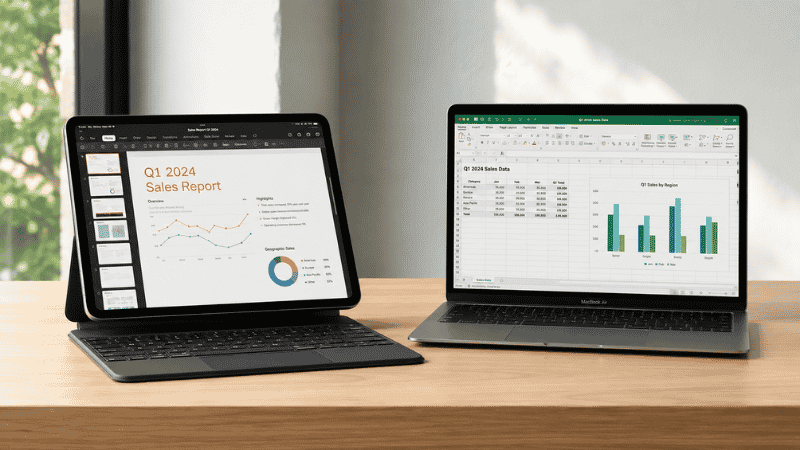
The question usually starts when you’re watching someone at a coffee shop work entirely from an iPad Pro with a keyboard case, looking effortlessly mobile and somehow more put-together than you with your laptop. Or maybe your MacBook is aging and you’re wondering whether an iPad would cover everything you actually do. Or perhaps someone told you that iPads have “basically caught up to laptops now.”
They haven’t. But it’s more complicated than that.
The iPad vs MacBook question in 2026 is genuinely more interesting than it was two years ago. iPadOS 26 introduced window management and file handling features that actually work, closing real gaps that existed for years. The M4 iPad Pro has hardware that rivals the MacBook Air in raw processing terms. And for certain kinds of work, the iPad is legitimately excellent — perhaps better than a laptop.
For other kinds of work, the iPad will frustrate you in ways that no amount of hardware power can fix, because the limitations are in the operating system, not the chip.
This guide gives you a clear answer based on how you actually work — not a balanced “both have pros and cons” that leaves you exactly where you started.
Key Takeaways
- iPadOS 26 (released September 2025) added genuine window management and improved file handling, making the iPad a more credible work device — but macOS still handles unlimited windows, virtual desktops, and full desktop applications that iPadOS cannot
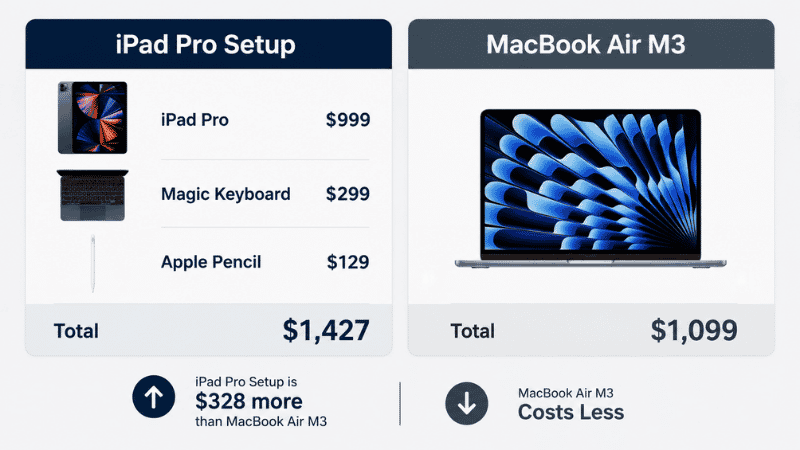
- The total cost comparison surprises most people: iPad Pro M4 ($999) + Magic Keyboard ($299) + Apple Pencil ($129) = $1,427, compared to MacBook Air M3 starting at $1,099 — the iPad setup costs $328 more while doing less
- The iPad genuinely wins for: creative work with Apple Pencil, portable consumption and note-taking, video calls, and workflows that are primarily app-based and touch-friendly
- The MacBook wins for: coding, complex file management, multi-window heavy multitasking, running full desktop software, and any workflow requiring a traditional desktop application
- The most honest answer for most remote workers: MacBook Air is the better productivity machine; iPad is the better companion device
What’s Actually Changed with iPadOS 26
Before comparing anything, the iPadOS 26 update matters enough to address directly — because most iPad vs MacBook articles were written before it and are now partially outdated.
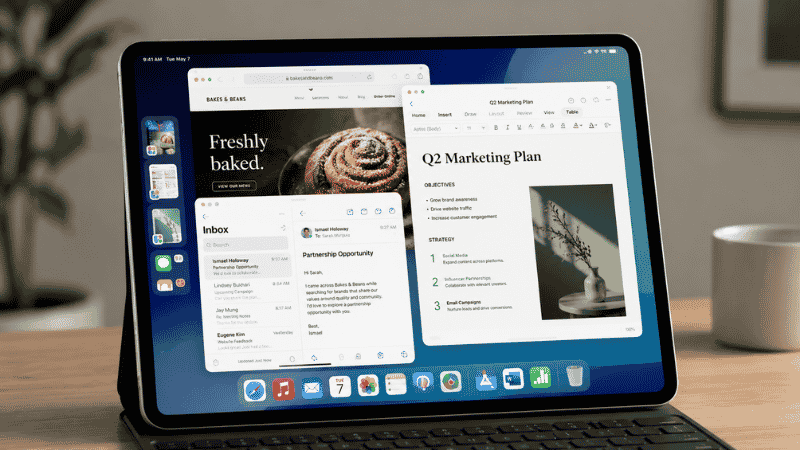
iPadOS 26, released September 2025, made real improvements to Stage Manager (Apple’s multi-window system) that previous versions never quite delivered. You can now resize and overlap windows more naturally, connect an external display and drag windows between screens, and use up to four apps side-by-side in a way that actually feels like a desktop workflow rather than a workaround. The Files app got improved too, with better folder management and Preview integration.
These are genuine improvements. They make the iPad meaningfully more capable for office work than it was in 2024.
What didn’t change: iPadOS 26 still doesn’t support multiple user profiles, still lacks a terminal, still can’t run full versions of apps like Xcode, DaVinci Resolve Studio, or Logic Pro. App memory management still causes reloads when multitasking heavily. File management is still more abstract than a traditional filesystem — there’s no user-accessible home folder structure the way macOS Finder provides.
The gap has narrowed. It hasn’t closed.
The Total Cost Reality Most People Get Wrong
Here’s the number that changes most conversations about iPad vs MacBook.
iPad Pro M4 (11-inch, 256GB): $999 Magic Keyboard (required for laptop-style use): $299 Apple Pencil Pro (if you want the pencil functionality): $129 Total: $1,427
MacBook Air M3 (13-inch, 256GB, 8GB RAM): $1,099
The iPad Pro setup costs $328 more than the MacBook Air while providing less multitasking capability, less software compatibility, and no keyboard or trackpad without the additional purchase.
This isn’t an argument that the iPad is a bad value. If you specifically need the Apple Pencil and touchscreen for your work, the iPad’s unique capabilities justify that price. But for people considering iPad as a laptop replacement purely for cost reasons — it almost never is. The “cheaper than a MacBook” assumption is usually based on comparing iPad hardware prices before adding the accessories that make it usable as a work device.
iPad vs MacBook: The Work Type Test
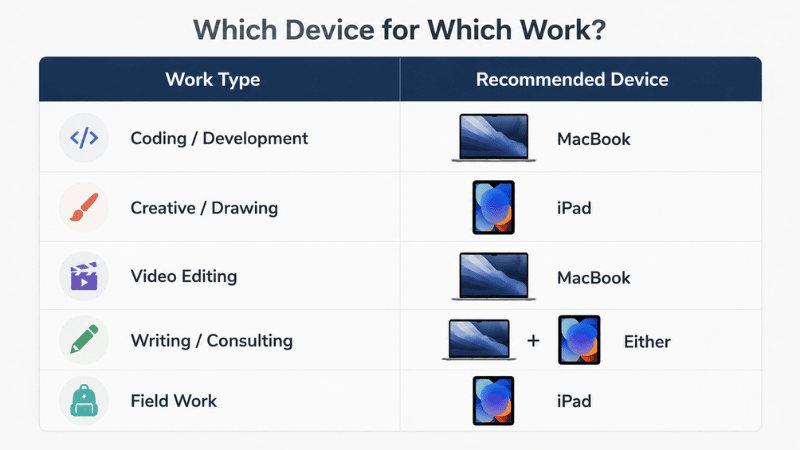
The right device for you depends almost entirely on what you do all day. Here’s the breakdown by work type.
If You Code, Develop, or Work in a Terminal
MacBook. This isn’t close.
iPadOS cannot run Xcode natively. It cannot run VS Code natively (there’s a web version, but it’s not the same). It has no terminal with full command-line access. You can use workarounds — SSH clients, remote desktop to a cloud machine, web-based IDEs — but they introduce friction and limitations that slow down every workflow.
One MacRumors community member who used an iPad Pro exclusively for two years before switching to a MacBook summarized it well: “Coding is a big part of my workflow. Doing this on an iPad is hard, if not impossible.”
If development is part of your work, get the MacBook.
If You Work Heavily in Microsoft Office
MacBook, with nuance.
Microsoft 365 works on iPad, and for basic Word, PowerPoint, and email — it’s fine. Excel on iPad handles standard spreadsheet work. But if your workflow involves complex Excel macros, Power BI Desktop, Access, or enterprise Office integrations, the iPad versions have meaningful limitations. The MacBook runs full desktop Office applications without the feature gaps.
For someone whose primary Office use is writing documents and presentations, the iPad works. For finance, analytics, or data-heavy Office workflows, the MacBook is the safer choice.
If You Do Creative Work with Drawing or Design
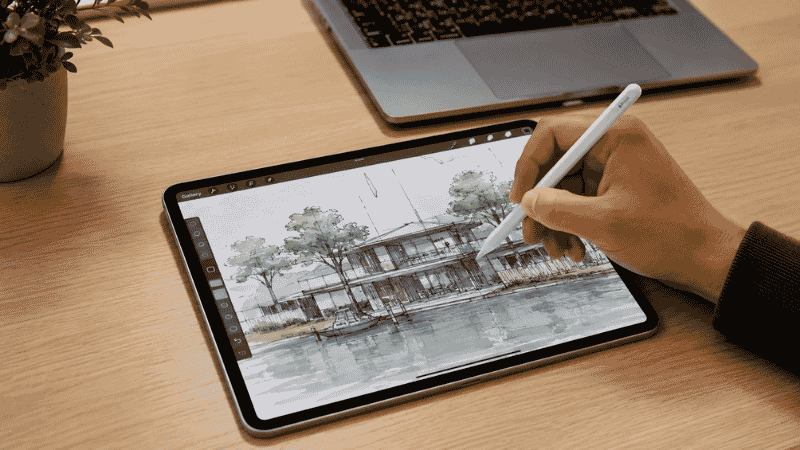
iPad, potentially.
The Apple Pencil and the iPad’s touch interface are genuinely better than anything a laptop trackpad offers for sketching, illustration, photo retouching, and annotation. Apps like Procreate, Affinity Designer, and Adobe Fresco are built around the iPad’s touch-first interaction model and are excellent.
For graphic designers who do illustration work, architects doing sketches, or anyone whose workflow involves freehand digital drawing — the iPad Pro with Apple Pencil is a legitimate professional tool that a MacBook can’t replicate in the same way.
The caveat: for complex design work in Adobe Creative Cloud’s full desktop applications, MacBook still runs more complete versions of Photoshop, Illustrator, and Premiere Pro.
If You Do Video Editing
Depends on your scale.
iMovie on iPad is capable for basic editing. The iPad Pro M4 has enough processing power for demanding tasks. But Final Cut Pro on Mac is significantly more capable than the iPad version, and DaVinci Resolve Studio doesn’t run on iPad at all. For professional-level video editing, MacBook.
For travel vloggers doing quick edits on the go, or social media creators working with shorter clips, iPad is a legitimate option.
If You’re a Writer, Consultant, or Knowledge Worker
This is where the iPad is most interesting and most honestly contested.
For someone whose work is primarily writing, email, Slack, Zoom calls, web research, and note-taking — the iPad with a keyboard can handle all of it. iPadOS 26’s improved multitasking handles having a browser, a writing app, and an email client open simultaneously. The iPad’s battery life is solid for all-day work.
The friction points: file management across multiple sources (cloud, local, email attachments) still feels more labored on iPad than on Mac. Switching between many browser tabs is less efficient. Some web-based tools work better on macOS than on mobile browsers.
The honest answer for knowledge workers: the iPad can replace a MacBook for your work, but the MacBook makes most tasks more efficient. The iPad has advantages in portability, battery life, and the touchscreen — but it’s not clearly better for the work itself.
iPad as Laptop Replacement: Where It Actually Works
Rather than the theoretical comparison, here are the real-world use cases where people have successfully used iPad as their primary work device.
Sales and client-facing roles. An iPad is a dramatically better device for client presentations, showing portfolios, and conducting consultations than a laptop. It’s more portable, the screen is more shareable, and the touchscreen interface is more natural for presenting.
Field work and mobile professionals. Real estate agents, healthcare workers doing rounds, educators moving between classrooms — anyone whose work involves constant movement benefits from the iPad’s form factor, weight, and durability advantages over a laptop.
Media consumption and research. Reading long documents, PDFs, and reports is genuinely more comfortable on an iPad than a laptop. If a significant portion of your “work” is reading and annotating rather than producing, the iPad earns its keep.
Secondary device for a desktop-primary worker. Many people who use a desktop Mac as their main production machine find the iPad an excellent companion device — for reading in meetings, video calls away from the desk, and handwritten notes that sync to their main machine.
The Setup That Doesn’t Get Mentioned Enough
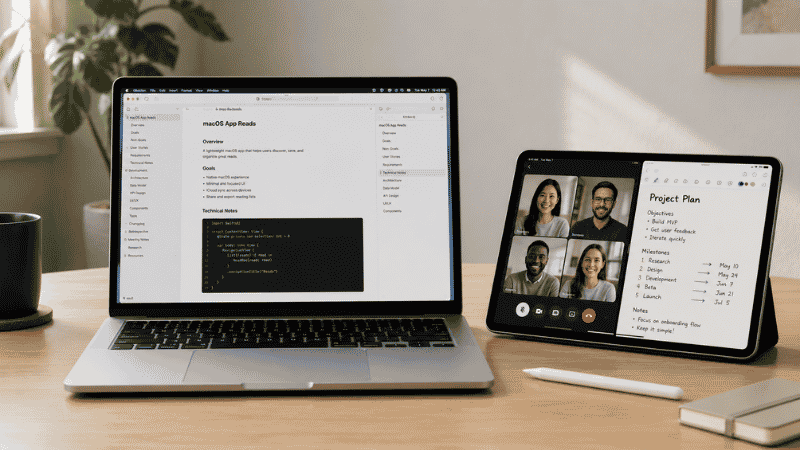
The best of both worlds isn’t picking one — it’s using both strategically.
Many remote workers run a MacBook as their primary machine and use an older or less expensive iPad (iPad Air or base iPad) as a companion. The iPad handles consumption, Zoom calls, and note-taking. The MacBook handles production, file management, and software. Each device does what it does best.
This doesn’t require buying both at full price. A refurbished iPad from Apple’s certified refurbished store, or a used iPad Air from a previous generation, costs $350–500 and provides the tablet companion experience without the full iPad Pro cost. Paired with an existing MacBook, this is often the most functional combination for home office workers.
The Honest Answer for Most People
If you’re trying to decide between iPad vs MacBook as your primary and only work device, the MacBook is almost always the better choice for remote work.
The reasons are practical, not tribal. The MacBook runs full desktop software without feature gaps. File management is more straightforward. Multitasking across many windows is less constrained. It costs less when configured for real work. And it doesn’t require carrying separate accessories to unlock basic laptop-style use.
The iPad is a genuinely excellent device — but it’s excellent in ways that complement a MacBook rather than replace it. Its touchscreen, Apple Pencil support, and portable form factor are real advantages. Its software limitations are also real, and iPadOS 26, while improved, hasn’t eliminated them.
If you have specific creative, presentation, or field work needs that the iPad’s unique capabilities serve — the iPad Pro is a legitimate choice. For most general knowledge workers doing their daily remote work: MacBook Air M3 or M4, and save the iPad purchase for when you have a specific reason for it.
FAQs
Can an iPad replace a laptop for work? For some work types, yes — particularly creative work with Apple Pencil, client presentations, and field work where mobility matters. For coding, complex file management, full desktop software, and heavy multitasking, an iPad cannot fully replace a laptop. Most remote workers doing general knowledge work will find a MacBook more capable as their primary device.
Is iPad Pro worth it over MacBook Air? Only if you specifically need what makes the iPad Pro unique: the touchscreen, Apple Pencil, and the form factor for creative or field work. When you factor in the cost of the Magic Keyboard and Apple Pencil, a fully equipped iPad Pro setup costs more than a MacBook Air while being less capable for traditional work tasks.
What did iPadOS 26 change for work use? iPadOS 26 (released September 2025) significantly improved Stage Manager (window management), added better file handling, and enabled external display workflows closer to desktop behavior. These are genuine improvements. However, iPadOS 26 still lacks terminal access, multiple user profiles, and full desktop application support.
Is the MacBook Air good enough for most remote work? Yes. The MacBook Air M3 and M4 handle virtually everything most remote workers need — video calls, document editing, web research, communication tools, coding, and creative work. The 18-hour battery life means all-day work on a single charge. For remote workers who need a single reliable primary device, it’s the most practical choice.
Should I get an iPad or MacBook as my first Apple device? If you need a general-purpose work computer: MacBook. If you already have a Windows computer for work and want an Apple device for media consumption, note-taking, and casual use: iPad. Don’t try to use an iPad as your only computer unless you’ve verified your specific workflow runs well on iPadOS.
Pick the Device That Fits Your Work, Not the One That Looks Impressive
The iPad Pro is a beautiful machine. It’s also genuinely capable in ways that weren’t true three years ago. But its value is tied to what it uniquely offers — touch interaction, the Apple Pencil, portability in a form factor laptops can’t match — not to its ability to replace a traditional computer.
For remote workers whose primary need is a reliable machine that runs their tools efficiently and handles a full workday without charging, the MacBook Air remains the more practical choice in 2026. The iPad is the device you add later, when you understand exactly what you want it for.
Know what you’re buying it to do. That question makes the choice obvious.
Related Articles on CircuitSeek
- Mac vs PC for Home Office →
- Best Laptops for Home Office 2026 →
- Thunderbolt Dock for Home Office →
- Best USB-C Hubs for iPad Pro →
- The Complete Home Office Setup Guide →
References
- Apple Inc. iPadOS 26 — Feature Overview. https://www.apple.com/ipados/ipados-26/features/
- Apple Inc. MacBook Air M3 — Technical Specifications. https://www.apple.com/macbook-air/specs/
- International Finance Magazine. IF Insights: The iPad as a viable MacBook Air alternative. https://internationalfinance.com/technology/if-insights-the-ipad-viable-macbook-air-alternative/
- MacRumors Forums. With iPadOS 26, what can’t an iPad Pro do compared with a MacBook Pro/Air? https://forums.macrumors.com/threads/with-ipados-26-what-cant-an-ipad-pro-do-compared-with-a-macbook-pro-air.2462388/