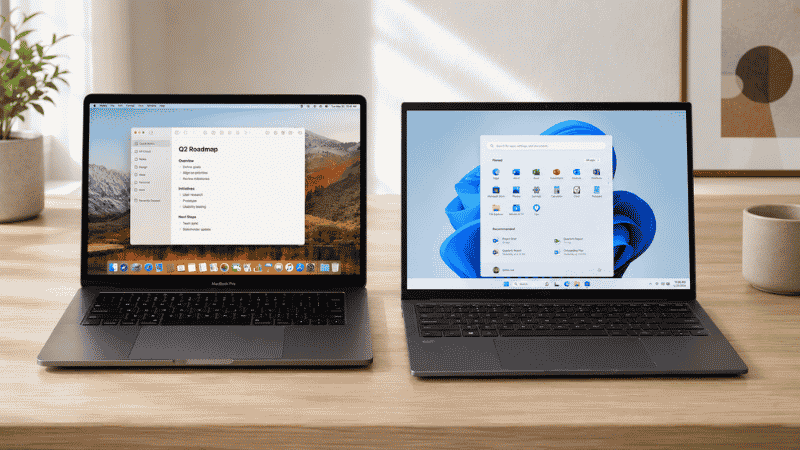
The Mac vs PC debate has been running for forty years and it hasn’t gotten more useful.
Both sides have their arguments. Mac people talk about build quality, the ecosystem, battery life, and how it “just works.” PC people talk about value, customization, gaming, and software compatibility. Neither side is wrong. Both sides are answering the wrong question.
The question isn’t “which is better.” The question is “which is better for how you specifically work.”
That’s the question this guide actually answers — and unlike most Mac vs PC comparisons, it’s going to give you a real answer for your situation rather than a balanced overview that leaves you exactly where you started. Because if you’re reading this, you’re probably trying to make a purchase decision, and “both have pros and cons” is genuinely unhelpful.
Here’s the honest picture, organized by how you actually work.
Key Takeaways
- The correct choice between Mac and PC depends almost entirely on your software dependencies, not on hardware specs or brand preference
- If your work is heavily tied to Microsoft’s ecosystem — Excel with complex macros, Power BI Desktop, Access, or Outlook with Exchange integrations — Windows is the safer choice; these tools work on Mac but with meaningful limitations
- Apple Silicon (M-series chips) has genuinely changed the performance equation: the M4 MacBook Air and Mac Mini deliver performance that outpaces Windows laptops at similar price points, with significantly better battery life
- The average learning curve for switching from Windows to Mac is 2–4 weeks for basic proficiency; most users report feeling fully comfortable within 60–90 days
- Total cost of ownership matters: Macs hold resale value significantly better than Windows laptops and typically last longer before needing replacement, which affects the true cost comparison
The Question That Actually Decides It

Before comparing anything, answer this: what software do you absolutely need to run?
This single question eliminates most of the confusion. Here’s why.
Macs run macOS. Windows PCs run Windows. Most common software — Microsoft 365, Chrome, Slack, Zoom, Notion, Figma, Adobe Creative Cloud — runs well on both. But some critical business software is Windows-only or works meaningfully better on Windows, and some creative and developer tools work meaningfully better on Mac.
If your software runs well on both platforms, everything else (hardware quality, battery life, price) becomes relevant. If you have a hard dependency on Windows-only software, the decision is already made for you.
Who Should Get a Windows PC
You live in the Microsoft ecosystem at a deep level.
Surface-level Microsoft 365 — Word, basic Excel, PowerPoint, Outlook — works fine on Mac. But if your work involves any of these, Windows is the safer choice:
Excel with complex VBA macros. Mac Excel supports VBA but with gaps — some macros that work perfectly on Windows don’t function the same way on Mac. If your spreadsheets have automation built by someone else and you can’t test them first, this is a real risk.
Power BI Desktop. This is Windows-only as of 2026. There’s a web version, but it lacks significant functionality. If Power BI is part of your daily work, you need Windows.
Access. Microsoft Access doesn’t exist on Mac at all. If your workflow involves Access databases, this is a hard requirement.
Specific enterprise software. A meaningful amount of corporate and industry-specific software — particularly in finance, insurance, healthcare administration, and manufacturing — was built for Windows and has no Mac version. If your company issues standard software you’re required to run, check compatibility before buying anything.
You want maximum flexibility and upgradeability.
Windows laptops and desktops come in a vastly wider range of hardware configurations and price points. A capable Windows laptop starts around $400–500; an equivalent Mac starts around $1,000. On the desktop side, a custom-built Windows PC can be upgraded component by component over years; Macs are largely sealed.
You need to run Windows-native games.
If you use your work machine for gaming in off-hours, Windows still has a significant advantage in game compatibility, even as Mac gaming has improved with Apple Silicon. This is less relevant for pure remote workers but worth mentioning for people who combine the machines.
Who Should Get a Mac
Your work is primarily creative, writing, or communication.
For the kinds of work that most remote workers and freelancers do — writing, design, video editing, coding, client communication, project management — Mac is genuinely excellent and in some areas significantly better than Windows at comparable prices.
After Apple’s M-series chips launched, the performance-per-dollar equation shifted dramatically. An M4 MacBook Air at $1,099 delivers processing performance, battery life (18+ hours real-world), and display quality that comparable Windows laptops struggle to match without significantly exceeding that price point.
You use other Apple devices.
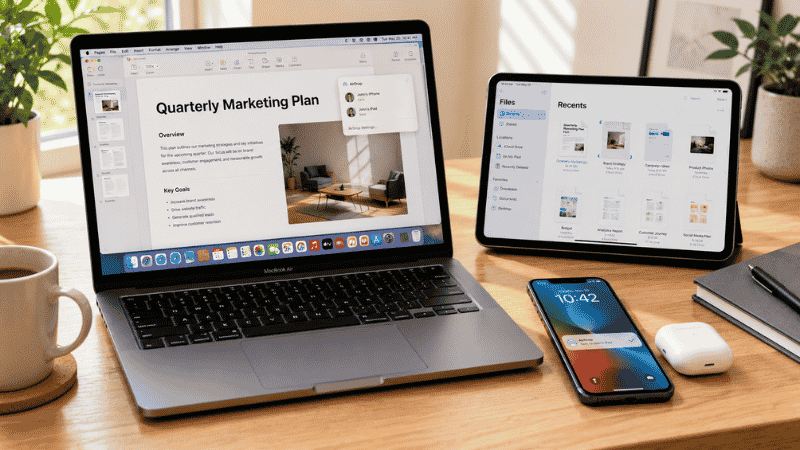
This is more significant than it sounds. If you use an iPhone and/or iPad, the Mac ecosystem integration — AirDrop for instant file transfer, Handoff for moving tasks between devices, iMessage on desktop, Universal Clipboard — removes genuine friction from your daily workflow. These aren’t flashy features; they’re things you’ll use dozens of times per day that work better than any cross-platform equivalent.
You’re tired of Windows maintenance.
This comes up constantly in discussions among people who switched. The sentiment is almost always the same: less time dealing with the computer, more time using it. Windows has improved significantly in recent years, but it still has more background update interruptions, driver issues, and random glitches than macOS. For people who just want their computer to be a tool that doesn’t require attention, Mac has a real advantage.
You’re a developer.
The Unix-based macOS terminal environment is closer to the Linux servers most web applications run on, which reduces friction between development and deployment. Git, Homebrew, Python, Ruby, Node.js — all install cleanly and work well. Many development teams standardize on Mac for this reason.
MacBook vs Windows Laptop: The Specific Hardware Comparison
When comparing laptops specifically, the Apple Silicon advantage is hard to ignore.
The M4 MacBook Air (starting $1,099) competes with Windows laptops in the $1,200–1,600 range in raw performance. Its battery life — genuinely 16–18 hours of real work, not manufacturer claims — is unmatched by any Windows laptop in 2026. The display, build quality, and trackpad are consistently rated at or above Windows competitors at higher price points.
The honest counterargument: a $700–800 Windows laptop is a functional home office machine that a $1,099 Mac clearly beats in value terms. If budget is the primary constraint and your software works on both platforms, a mid-range Windows laptop delivers solid performance for the price.
Where Windows laptops win on hardware: touchscreen capability (most MacBooks lack touchscreen), pen input for drawing and annotation, more port variety on many models, and the ability to run at much higher screen resolutions than Apple’s non-Pro displays.
Switching from Windows to Mac: What the Adjustment Actually Looks Like

If you’ve decided Mac is the right choice but you’ve used Windows for years, here’s what the transition realistically involves.
The keyboard is different, and it will bother you for a few weeks.
The Command key does what Control does on Windows — but not always. Command+C copies, Command+V pastes, Command+Z undoes. But some Windows keyboard shortcuts have no direct equivalent, and others work differently. The muscle memory for keyboard shortcuts takes 2–4 weeks to rebuild. Most people report feeling fully natural within 60–90 days.
File management works differently.
Windows Explorer becomes macOS Finder, which works similarly but has a different organizational logic. There’s no drive letter system — everything is under one directory structure. Files and folders behave basically the same way; the interface takes a few days to feel natural.
Some of your Windows software won’t transfer.
Most popular software has Mac versions. But any software you’ve been using that’s Windows-only — check this before you buy. A quick Google search for “[software name] Mac” will tell you immediately. The common surprises: no Windows-only productivity tools, no Microsoft Teams add-ins that were Windows-specific, no legacy software your company might have deployed.
Microsoft 365 works, with caveats.
Word and PowerPoint on Mac are essentially identical to Windows for most users. Outlook on Mac has improved significantly. Excel is where most people notice differences — the Mac version doesn’t support every Windows feature, and some keyboard shortcuts differ. For basic Excel work, this won’t matter. For advanced users, it’s worth testing your specific workflows before committing.
The Total Cost Comparison That Most People Get Wrong
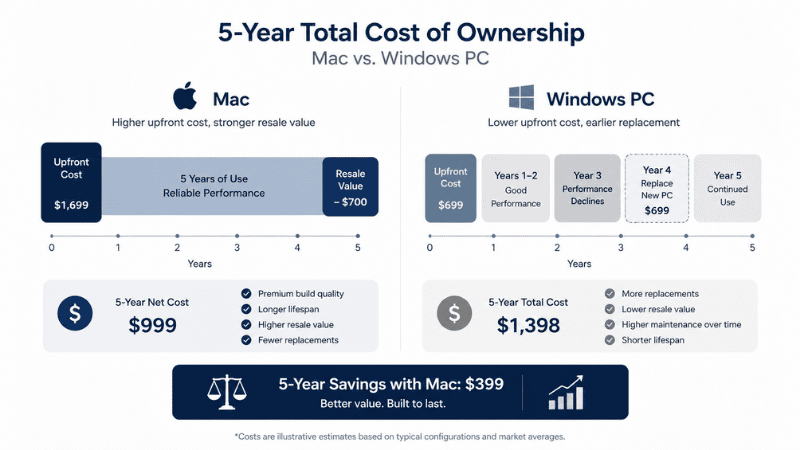
Macs cost more upfront. That’s real and it matters. But the total cost over 4–5 years often looks different.
Macs hold resale value significantly better than Windows laptops. A 3-year-old MacBook Air typically sells for 50–60% of its original price. A 3-year-old Windows laptop of equivalent specs might sell for 20–30%. This doesn’t eliminate the price premium, but it reduces it.
Macs also tend to stay usable longer. The average Mac is used for 5–7 years; the average Windows laptop is replaced after 3–4 years. If you factor in replacement cycles, a $1,099 Mac used for 6 years costs less per year than a $700 Windows laptop replaced after 3 years.
This isn’t an argument that Mac is always the better financial decision. It’s an argument that the price comparison is more nuanced than the sticker price suggests. For someone on a strict annual budget, a Windows laptop may genuinely be the right choice. For someone making a one-time investment in a work setup, the Mac’s longevity and resale value change the calculation.
The Honest Summary by User Type
If you want a direct answer based on who you are:
Heavy Excel/Power BI/Access user: Windows. The Mac versions have gaps that will frustrate you.
Writer, consultant, project manager, general knowledge worker: Either works well. Mac has better battery life and build quality at the price point; Windows gives you more options at lower prices.
Designer or video editor: Mac, particularly with Apple Silicon. The performance advantage and software ecosystem (Final Cut Pro, Logic Pro, Mac-exclusive creative apps) are real.
Software developer: Mac, for most use cases. The Unix terminal environment and developer ecosystem align naturally with macOS.
Finance professional with MS ecosystem dependencies: Windows. Don’t fight the tooling.
Someone who just wants a reliable machine that doesn’t require maintenance: Mac. The “it just works” reputation is earned.
Someone switching companies and getting a company-issued machine: Use what they give you. The adjustment is manageable.
If You’re Still Genuinely Undecided
The best sign that you should probably get a Mac: you primarily do communication, writing, creative work, or general knowledge work, you use an iPhone, and you’re tired of maintaining a Windows machine.
The best sign that you should stay on Windows: your software dependencies are Windows-specific, you want more hardware flexibility and lower price points, or you need to run software your company standardizes on.
If you’re honestly 50/50 after reading this — and your software works on both — buy the Mac. The battery life, build quality, and reduced maintenance overhead are worth the price premium for most remote workers who can absorb the upfront cost. But that’s an opinion, not a rule.
FAQs
Is Mac or PC better for working from home? For most remote workers whose tools run on both platforms, Mac has practical advantages: better battery life for laptop use, less maintenance overhead, and strong ecosystem integration with iPhone. For workers heavily dependent on Windows-specific software (Power BI, Access, VBA-heavy Excel), Windows is the better choice.
How long does it take to adjust to a Mac after using Windows? Most users reach basic proficiency within 2 weeks and feel fully comfortable within 60–90 days. The keyboard shortcuts are the biggest adjustment — the Command key replaces Control for most shortcuts, but not all. File management and general navigation feel natural to most users within a week.
Is Excel better on Mac or Windows? For most users doing standard spreadsheet work, Mac Excel is fine. For users relying on complex VBA macros, Power Query with Windows-specific data connectors, or Power Pivot, Windows Excel is more reliable. Power BI Desktop has no Mac version.
Are Macs worth the extra cost for home office use? For many remote workers, yes — over a 5+ year ownership period. Macs retain resale value better, last longer before replacement, and require less maintenance time. The upfront premium ($300–500 more than a comparable Windows laptop) shrinks when factored across a longer ownership cycle. Budget-constrained buyers can get strong performance from Windows at lower entry prices.
Can I run Windows on a Mac? On Intel Macs (pre-2020), Boot Camp allowed native Windows installation. Apple Silicon Macs (M1 and later) don’t support Boot Camp, but virtualization software like Parallels Desktop runs Windows well for most office applications. Gaming and graphics-intensive Windows software have limitations under virtualization.
The Answer Is Already in Your Workflow
Most people who agonize over Mac vs PC already have the answer — they just haven’t articulated it yet. What software do you actually use every day? Does it run well on macOS? If yes, the decision comes down to budget, preference, and ecosystem. If no, you have your answer.
Stop comparing processor benchmarks and display nit counts. Look at your software list first. The right machine for your home office is the one that runs your work tools reliably, lasts through your day without hunting for a charger, and gets out of your way.
Related Articles on CircuitSeek
- The Complete Home Office Setup Guide →
- Best Laptops for Home Office 2026 →
- Why Is My Laptop So Slow? →
- Dual Monitor Setup Guide →
- Best USB-C Hubs for Laptop →
References
- Consumer Intelligence Research Partners (CIRP). Mac vs PC Market Share and User Demographics Report, 2025.
- Apple Inc. Apple Silicon Performance Benchmarks — M4 Series. https://www.apple.com/mac/compare/
- Microsoft. Microsoft 365 for Mac — Feature Comparison. https://support.microsoft.com/en-us/office/differences-between-using-a-document-in-the-browser-and-in-word
- Statista. Average laptop replacement cycle by operating system, 2024. https://www.statista.com/