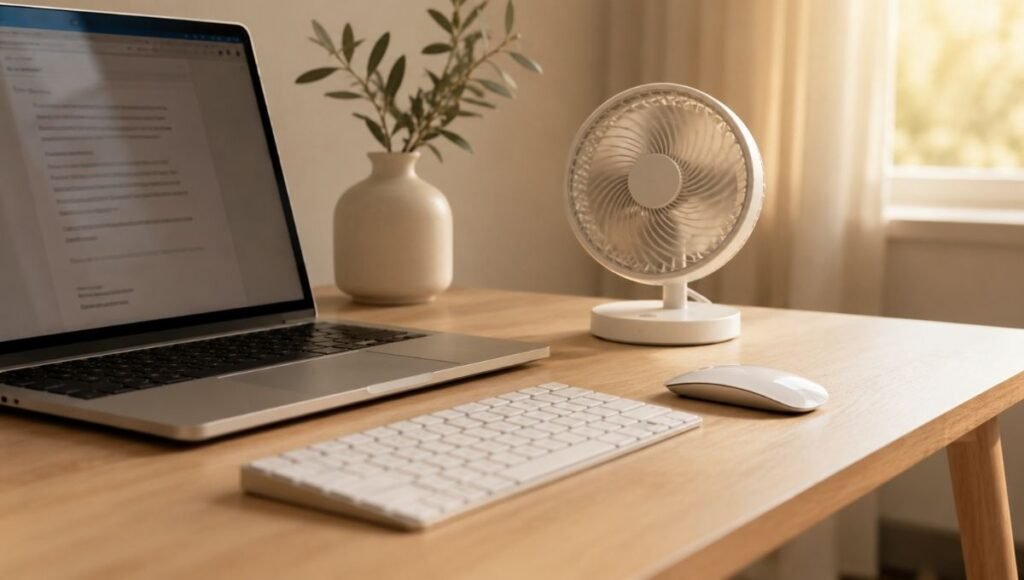
It usually happens around 2 p.m.
The room has warmed up, you’re three hours into your afternoon, and the still air around your desk has started to feel genuinely uncomfortable. You open a window and get street noise. You turn on the AC and the whole apartment gets cold. You try to just push through, which works until it doesn’t — until the warmth is actively making it hard to think clearly.
A desk fan is a small, obvious solution that most home office setups don’t include, mainly because nobody told you what to actually look for. Most fan guides recommend based on general performance: airflow, speed settings, build quality. But when you work from home, there’s an additional requirement that almost nobody talks about — noise.
Not noise in the abstract “this fan is quiet” sense. Noise in the very specific sense of: will this fan’s hum be audible to the people I’m on a call with? Because a fan that’s perfectly acceptable at 45 decibels in an office becomes a problem when your microphone is three feet away and your colleague is trying to hear you through the background whirr.
This guide covers desk fans specifically for home office use — which means quieter thresholds than a general fan guide, placement that actually works on a desk, and recommendations by the situation you’re actually in.
Key Takeaways
- For video calls, the effective noise threshold is around 35dB or below — fans louder than this are often picked up by standard laptop and webcam microphones
- USB-powered desk fans draw power from your laptop or a USB port rather than a wall outlet — convenient for desk cable management, but typically less powerful than AC-powered options
- A desk fan positioned to your side at roughly 45 degrees is more comfortable and less intrusive than one blowing directly at your face
- The Vornado Pivot (~$20-26) is consistently rated as the best overall desk fan at its price point for combined airflow and quiet operation
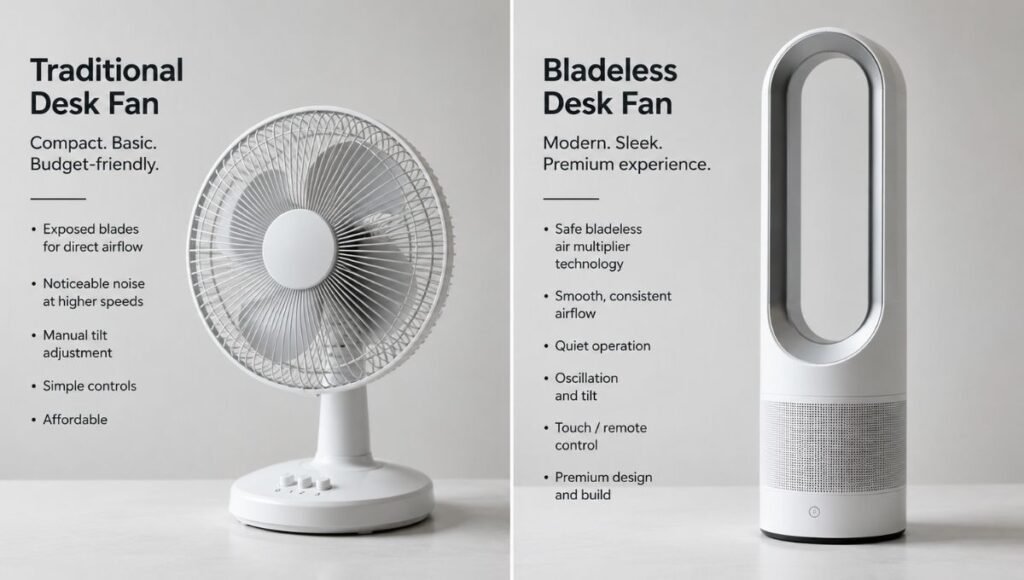
- Bladeless fans (like Dyson’s desk range) are significantly quieter and easier to clean, but cost 5–10x more than traditional desk fans — worth it only for specific use cases
- OSHA recommends maintaining workplace temperatures between 68–76°F for optimal cognitive performance — a desk fan helps you hit this range without cooling the entire room
What “Quiet” Actually Means for a Home Office Desk Fan
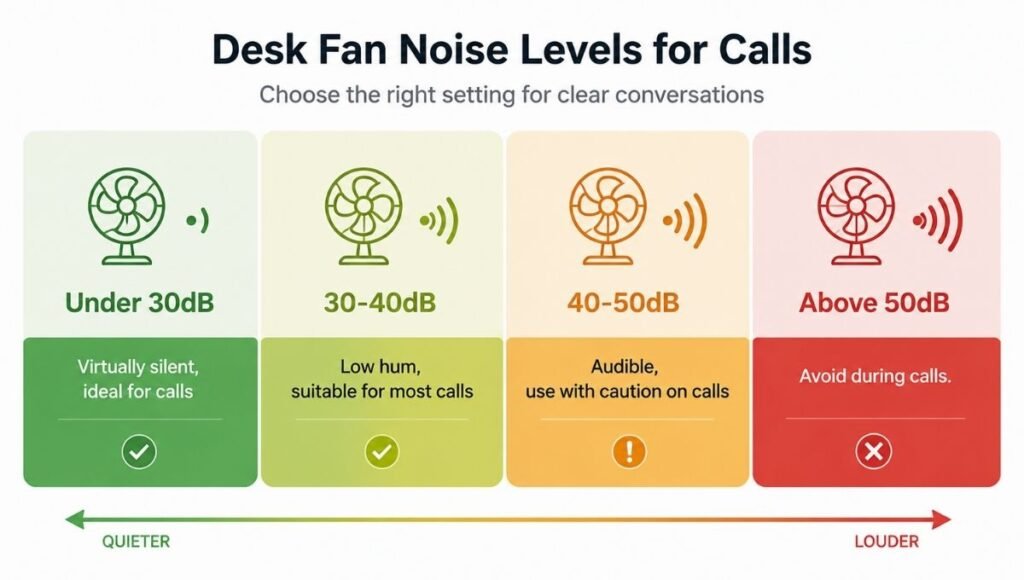
Noise ratings on fan product pages are almost useless without context. A fan listed as “quiet” might mean anything. Here’s what the decibel numbers actually mean for work:
Below 30dB: Virtually silent. You can hear it only if the room is completely still. Suitable for any call situation, including podcast recording. This level is rare in desk fans — typically only found in premium bladeless options.
30–40dB: Noticeable in a quiet room but unlikely to be audible through a decent microphone with noise suppression. Most good desk fans fall in this range on their lower settings. This is the target range for home office use.
40–50dB: Clearly audible in the room. Likely to bleed into microphone pickup on laptop mics, especially on high settings. Acceptable if you’re not on calls, disruptive if you are.
Above 50dB: Equivalent to a moderate conversation. Will definitely be picked up by microphones. Fine for personal airflow, inappropriate for video call environments.
The practical implication: most desk fans are fine on their lower speed settings for call environments, and problematic only when cranked to high. If you’re frequently on calls, a fan with more low-speed options gives you more control.
The Video Call Problem: What Most Desk Fan Reviews Miss
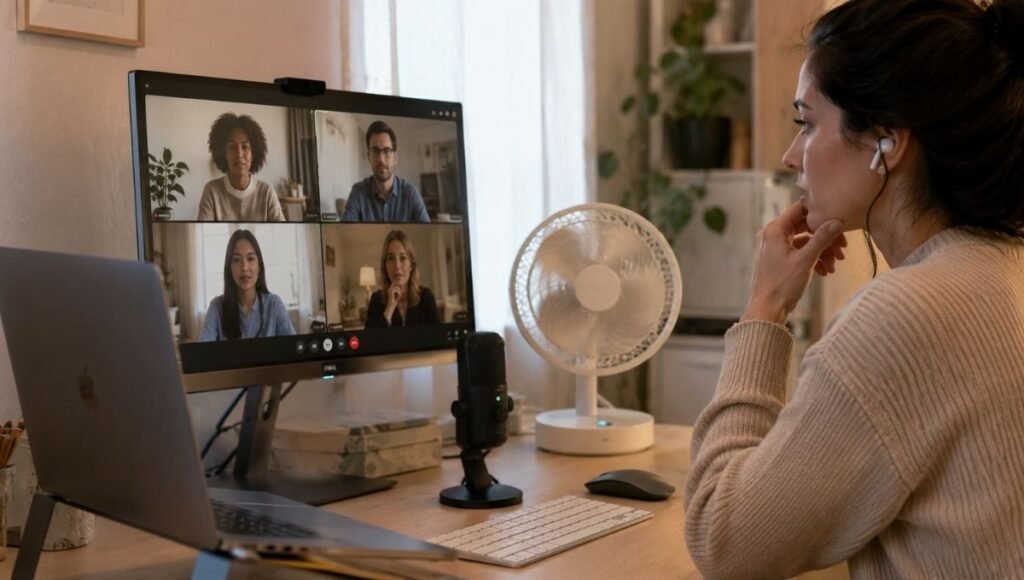
Here’s the scenario that general fan guides don’t address.
You’re on a Zoom call. It’s warm. You turn on your desk fan. Your colleague hears — clearly — a low rhythmic hum behind everything you say. They might not mention it. But it’s there, degrading call quality and making you sound slightly less professional than you’d like.
The variables that determine whether this happens:
Microphone type. A dedicated USB condenser microphone with cardioid pickup pattern is less susceptible to fan noise than a laptop microphone. If you use a dedicated mic, you have more flexibility in fan choice. If you use laptop audio, be more conservative.
Fan distance and angle. A fan 3 feet directly behind your monitor will be louder in your microphone than the same fan positioned to your side. Placement matters as much as fan noise level.
Software noise cancellation. Zoom, Teams, and Google Meet all apply noise cancellation to outgoing audio. This helps considerably — a fan at 38dB is often filtered out effectively by software noise suppression. A fan at 50dB may not be.
The test you should do: Turn on your fan at your intended working speed. Open a voice memo app and record 30 seconds. Play it back. If the fan is clearly audible in the recording, it will be audible to call participants. If it’s barely present, you’re probably fine.
Best Desk Fan for Home Office: Recommendations by Use Case
For Video Calls and Quiet Work Sessions: Prioritize Low Noise
Vornado Pivot Personal Air Circulator (~$20–26)
This is the most consistently recommended desk fan in its price range, and for good reason. On its two lower speed settings, it operates quietly enough for most call environments — somewhere in the 35–42dB range depending on distance. The air circulation design moves more air per decibel than a standard fan blade design, which means effective airflow at lower, quieter speeds.
The form factor is compact — about 6 inches tall — and the pivot mechanism lets you direct airflow at virtually any angle. It’s also AC-powered, which gives it more sustained airflow than USB options. For under $30, it’s the most straightforward recommendation for home office desk use.
Honeywell HT-900 TurboForce (~$18–22)
Slightly more affordable, slightly louder at equivalent speeds. Still a strong choice for pure personal airflow where calls aren’t the primary concern. The turbo setting is genuinely powerful for the size; the low setting is usable in call environments. A reliable choice if you want strong airflow on a tight budget.
For Frequent Video Calls: The Quiet-First Options
Dyson Cool AM06 (~$299–349)
This is where the bladeless premium becomes genuinely justifiable for home office users. The AM06 operates at around 28–32dB on its lower settings — below the threshold where microphones typically pick it up, even at close range. It’s also significantly easier to clean than bladed fans, which matters for desk use where dust accumulates. The remote, timer function, and sleep mode are useful features for an always-on desk device.
At nearly 10 times the cost of the Vornado Pivot, this is not a casual purchase. But for remote workers who are on calls most of the day and want to run a fan without thinking about microphone contamination, it solves the problem completely.
Meaco Sefte 8-inch Air Circulator (~$80–110)
A strong middle ground between the Vornado and Dyson price points. Meaco claims 27dB on lower settings — close to inaudible for most recording environments. It’s a bladed fan (not bladeless) but uses a design that prioritizes quiet operation. Available in UK and EU markets primarily; availability in the US is more limited.
For Portability and USB-Powered Setups
EasyAcc USB Desk Fan (~$15–22)
USB-powered, meaning it draws power from your laptop or a USB charger rather than a wall outlet. The benefit for desk setups: one fewer cable to manage, and the fan moves with you if you shift to a different room. The tradeoff: USB power limits maximum airflow compared to AC-powered options. For someone working in a moderately warm room rather than a hot one, adequate. For someone dealing with genuine heat, the airflow may not be sufficient.
Gaiatop USB Fan (~$12–18)
360-degree rotation on both axes makes this more versatile than most USB options. Ultra-compact. Runs off any USB port including power banks, which is useful for balcony or outdoor work sessions. Quiet at low settings. Not powerful enough for high-heat environments but a solid choice for general ambient airflow.
Where to Put a Desk Fan (Placement Matters More Than People Expect)
Most people put their desk fan directly in front of them, pointed at their face. This is the least comfortable placement for sustained use.
Airflow directed continuously at your face dries out your eyes and skin, which compounds the eye strain and fatigue that screen work already creates. After 30–60 minutes of direct frontal airflow, many people turn the fan off — defeating the purpose of having it.
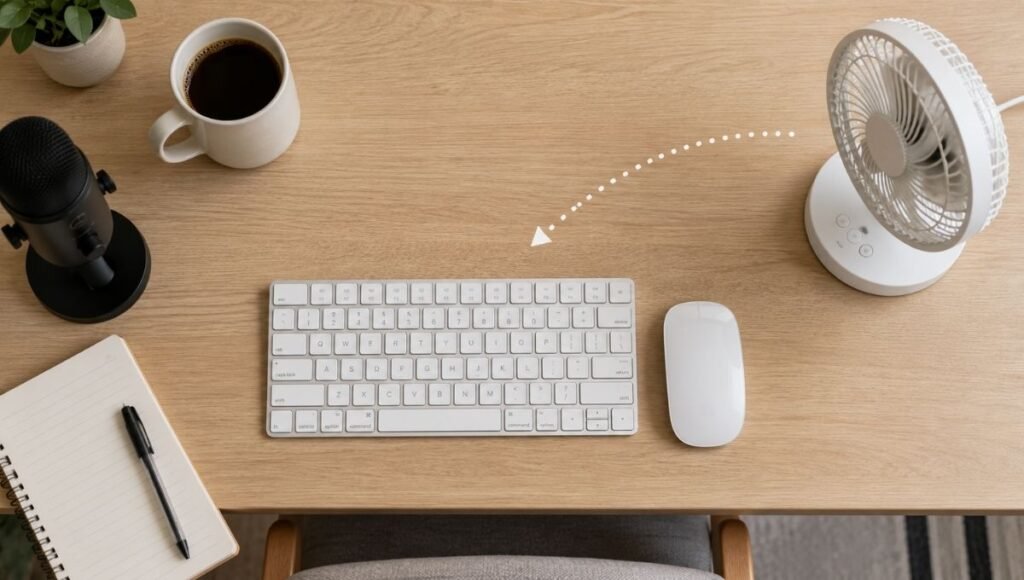
The better placement: to your side at roughly 45 degrees.
Position the fan to the left or right of your keyboard area, angled toward you but not pointing directly at your face. This creates ambient airflow around your body that keeps you cool without the drying effect of direct frontal airflow. You’ll feel the air movement without staring into the fan’s output.
Distance from your microphone: If you’re using a desktop microphone, position the fan on the opposite side of your desk from the mic. Most cardioid microphones reject sound from behind and the sides — placing the fan behind the mic (relative to where you’re sitting) reduces pickup significantly.
Distance from your monitor: Keep the fan’s airflow directed away from your screen. While modern monitors aren’t damaged by airflow, the visual distraction of things on your desk moving in the airstream is a minor but real focus irritant.
The Small Desk Fan Problem: When Space Is the Constraint
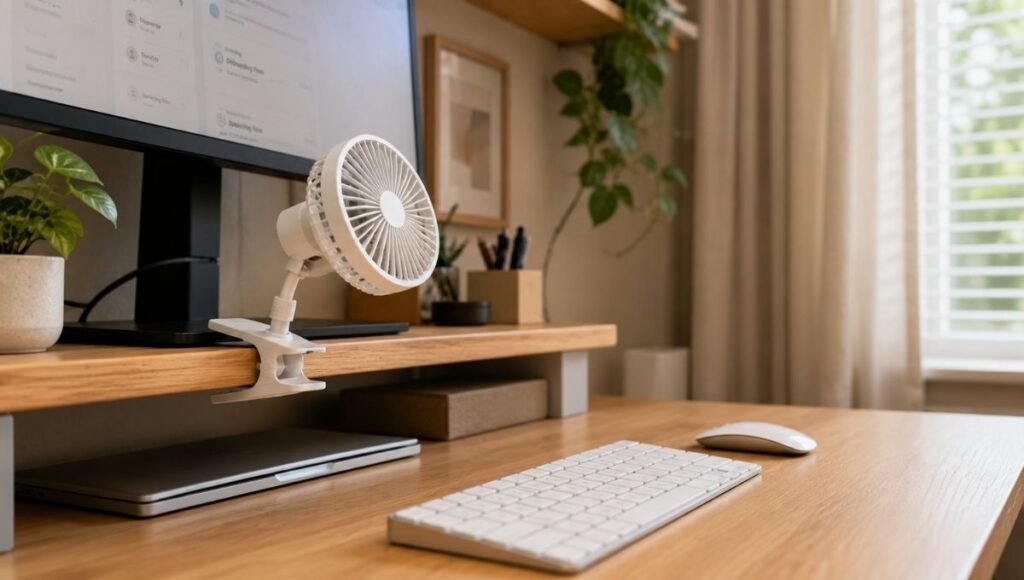
If you’re working at a desk smaller than 40 inches, or if your desk is already crowded with monitor, keyboard, mouse, and various accessories, a full-size desk fan can feel like one more thing competing for space.
A few options for small desk situations:
Clip-mounted fans attach to the edge of your monitor, a shelf, or a desk edge — off the desk surface entirely. Airflow is decent; they’re not as powerful as freestanding fans but eliminate the footprint problem. The Treva 10-inch Desktop Fan with clamp is one of the cleaner options in this category (~$20–30).
Mini USB fans with under 6-inch footprints sit in the corner of a desk without consuming meaningful space. The trade-off is airflow — these are genuinely small and move proportionally small amounts of air. Adequate for mild warmth; insufficient for hot conditions.
Above-desk options: A small tower fan on a nearby shelf or pedestal stand moves air into your space from a standing position without occupying desk real estate at all. More airflow than a mini fan, zero desk footprint. Worth considering if your desk layout simply doesn’t accommodate a fan.
What to Do If Your Fan Is Still Too Loud for Calls
If you’ve bought a fan and find it’s too audible on calls, a few options before giving up on it:
Enable software noise cancellation at maximum settings in your video call app. In Zoom: Settings → Audio → Background Noise Suppression → High. In Teams: Settings → Devices → Noise Suppression → High. This won’t eliminate all fan noise but significantly reduces it.
Use a directional microphone positioned away from the fan. A USB condenser mic with cardioid pickup pattern, positioned so the fan is behind the mic (in its null rejection zone), will pick up substantially less fan noise than a laptop mic.
Run the fan only between calls. If your schedule has natural breaks between meetings, you don’t need the fan running during calls — the thermal inertia of having run it for the previous 20 minutes means the room is cooler than it would be otherwise.
If You Only Have 10 Minutes to Decide
You need a desk fan. You don’t want to overthink it.
If you’re on calls regularly and the fan will be running during them: get the Vornado Pivot (~$25). Run it on the lowest setting during calls. Check with the voice memo test before committing to it in a live call.
If calls aren’t a concern and you just want effective personal cooling: the Honeywell HT-900 (~$20) moves more air for the money.
If budget is no object and you’re on calls all day: the Dyson AM06 (~$329) solves the noise problem completely and won’t require you to think about it again.
FAQs
What is the quietest desk fan for home office use? Bladeless fans from Dyson — particularly the AM06 — operate at 28–32dB on lower settings, below the threshold where microphones typically pick them up. Among traditional bladed fans, the Vornado Pivot and the Meaco Sefte are the quietest well-reviewed options in their price ranges, operating at 35–42dB on lower settings.
Will a desk fan be picked up by my microphone on Zoom calls? It depends on the fan’s noise level and your microphone type. Fans operating above 45dB at close range are often audible through laptop microphones. Fans at 35dB or below are typically filtered by Zoom’s noise suppression. The test: record a voice memo with the fan running and play it back — if you can clearly hear the fan, call participants will too.
Is a USB desk fan powerful enough for a home office? For mild to moderate warmth, yes. USB fans are limited by the power available through a USB port (typically 5W or less), which constrains maximum airflow. If you’re working in a hot room, a USB fan may not move enough air to make a meaningful difference. For serious cooling needs, an AC-powered fan delivers substantially more airflow.
How far should a desk fan be from my face? For comfortable sustained use, 2–4 feet is the recommended range. Fans closer than 2 feet create drying airflow that causes eye and skin discomfort over time. Position the fan to your side rather than directly in front for the most comfortable extended use.
Are bladeless desk fans worth the cost? For general personal use, no — traditional bladed fans provide similar airflow at a fraction of the price. For home office users who are on calls frequently and want a fan that’s genuinely inaudible on microphones, the Dyson bladeless fans justify their premium by solving the noise problem completely. For everyone else, the Vornado Pivot at $25 is a better value.
Staying Comfortable Is Part of Staying Productive
OSHA’s guidance on office environments recommends maintaining temperatures between 68–76°F for sustained cognitive performance. That’s not just comfort — it’s the temperature range where people concentrate best, make fewer errors, and sustain focus longer.
A desk fan doesn’t cool a room. But it does create localized airflow that makes your immediate environment feel several degrees cooler than the ambient temperature — enough to stay in that optimal range on days when your space runs warm.
It’s a small addition to a home office, but a useful one. Choose based on your noise requirements first, airflow second, and everything else third.
Related Articles on CircuitSeek
- Best Headphones for Working from Home →
- Desk Organization Ideas That Actually Stick →
- Eye Strain Relief for Remote Workers →
- Do Blue Light Glasses Work? →
References
- Occupational Safety and Health Administration (OSHA). OSHA Technical Manual — Section III: Chapter 2, Ventilation Investigation. https://www.osha.gov/otm/section-3-health-hazards/chapter-2
- Seppänen, O., Fisk, W.J., & Lei, Q.H. (2006). Effect of Temperature on Task Performance in Office Environment. Lawrence Berkeley National Laboratory. https://escholarship.org/uc/item/45g4n3rv
- American Society of Heating, Refrigerating and Air-Conditioning Engineers (ASHRAE). Standard 55-2020: Thermal Environmental Conditions for Human Occupancy. https://www.ashrae.org/technical-resources/bookstore/standard-55-thermal-environmental-conditions-for-human-occupancy